Key takeaways
- Two projects are called Blender MCP: the community MCP for Blender by Siddharth Ahuja, and an official server from Blender Lab that reached version 1.0.0 on April 27, 2026.
- Both pair a Blender add-on that listens on port 9876 with an MCP server that Claude Desktop, Claude Code or Cursor starts through uv.
- Both let the AI run Python inside Blender, so the community README says to save your work first, and its socket has no authentication.
Blender MCP connects an AI assistant such as Claude to a running copy of Blender, so you can ask in plain English for a scene, a material or an answer about a file and the assistant does it through Blender's Python API. Two projects go by that name as of November 25, 2026: the popular open-source MCP for Blender by Siddharth Ahuja, formerly called blender-mcp, and an official Blender MCP server from Blender Lab, which publishes it on the Blender project's own code host. Only the second is official.
This guide gets either one working with Claude Desktop, Claude Code or Cursor, so an assistant can see and change your open scene. The steps come from each project's docs and Anthropic's; they were not run for this guide.
MCP, the Model Context Protocol, lets an AI app call tools on your computer. If it is new to you, see what MCP is. Our Figma MCP setup guide follows the same pattern.
Which Blender MCP is official
| MCP for Blender (community) | Blender MCP (Blender Lab) | |
|---|---|---|
| Made by | Siddharth Ahuja | Blender Lab |
| Official | No. The README says it is "a third-party integration and not made by Blender" | Yes, hosted on projects.blender.org |
| License | MIT | GPL-3.0-or-later |
| Blender version | 3.0 or newer | 5.1 or newer |
| Python | 3.10 or newer | 3.10 or newer |
| Focus | Building scenes: modeling, materials, assets, AI-generated 3D models | Inspecting and debugging files, Python API and manual lookup |
| Latest release | PyPI package mcp-for-blender 2.3.1 |
v1.0.3, September 11, 2026 |
| Default port | 9876 | 9876 |
The community project's site says it is "Not affiliated with or endorsed by the Blender Foundation." Its Python package was renamed from blender-mcp to mcp-for-blender. The README says old setups that run uvx blender-mcp keep working, and new installs should use the new name.
Blender Lab's server reached version 1.0.0 on April 27, 2026. Its README calls it "deliberately small," a way to "explore and understand complex setups" through Blender's Python API. Claude's connector directory lists it as Blender, made by Blender Lab, marked Anthropic verified and added in April 2026.
How Blender MCP works
Both projects have the same two parts. A Blender add-on opens a small server inside Blender on a TCP port, 9876 by default. A separate MCP server process, started by your AI app, talks to the app over standard input and output and passes each request to the add-on. The add-on runs it inside Blender and sends back the result.
Because both add-ons use port 9876 by default, enable only one of them at a time, or change the port in one add-on's settings and in the matching client config.
What you need first
- Blender 3.0 or newer for the community add-on, or Blender 5.1 or newer for the official one.
- Python 3.10 or newer.
- uv, the Python package manager both projects use to start the server. The community README warns to install it with its official installer, not
pip install uv, which "may not create theuvxcommand." - An MCP client: Claude Desktop, Claude Code, Cursor, or another app on each project's list.
How to install the community MCP for Blender
The README offers a one-line installer that installs uv, finds your MCP clients and sets up the add-on. On macOS and Linux it is curl -LsSf https://www.mcp-for-blender.com/install.sh | sh. If you would rather see each step, or Windows Defender blocks the script, do it by hand.
Step 1: install uv
On macOS, brew install uv. On Linux:
curl -LsSf https://astral.sh/uv/install.sh | sh
On Windows, winget install --id=astral-sh.uv -e.
Open a new terminal afterwards so uvx is on your PATH. If you already have uv, uvx mcp-for-blender setup runs the same guided setup as the installer. The README says it only adds a blender entry to each config file and saves a .bak copy of every file it changes.
Step 2: add the server to your AI app
Claude Desktop. Open Settings, then Developer, then Edit Config, and add this to claude_desktop_config.json:
{
  "mcpServers": {
    "blender": {
      "command": "uvx",
      "args": ["mcp-for-blender"]
    }
  }
}
Claude Code. Add it from the terminal. Anthropic's Claude Code docs put a -- between Claude Code's own options and the command that starts the server:
claude mcp add --transport stdio blender -- uvx mcp-for-blender
The project README writes it as claude mcp add blender uvx mcp-for-blender. Add --scope user to make the server available in every project instead of only the current one. Check it with claude mcp list, or /mcp inside a session.
Cursor. On macOS, open Settings, then MCP, and paste the same JSON as for Claude Desktop, either as a global server or in a .cursor/mcp.json file at the root of a project. On Windows, the README wraps the command in cmd:
{
  "mcpServers": {
    "blender": {
      "command": "cmd",
      "args": ["/c", "uvx", "mcp-for-blender"]
    }
  }
}
The README also covers Codex, VS Code, OpenCode and Antigravity, and says to run only one instance of the server, in Cursor or Claude Desktop, not both.
Step 3: install the Blender add-on
uvx mcp-for-blender install-addon
This copies the add-on into Blender's add-ons folder. Then open Blender, go to Edit, Preferences, Add-ons, and enable Interface: MCP for Blender. If the command can't find Blender, install the repository's addon.py from that screen instead.
Step 4: connect
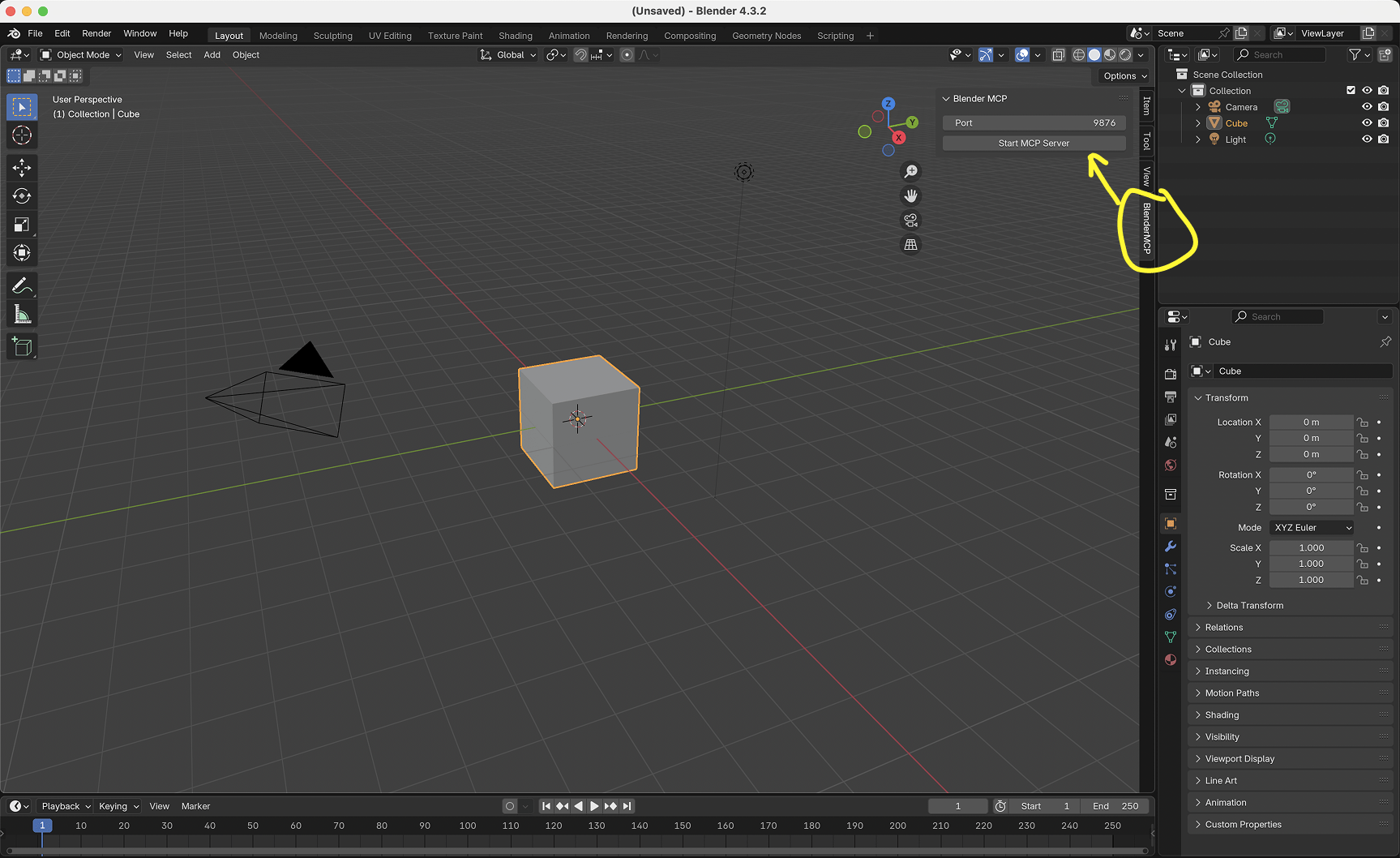
Fully quit and reopen your AI app. On Windows, quit it from the system tray. The add-on starts its server when Blender opens. To check, press N in the 3D viewport, open the MCP for Blender tab, and click Start MCP Server if it isn't running.
How to install the official Blender Lab MCP server
Step 1: install the add-on from the Blender Lab repository
The official add-on is a Blender extension that needs Blender 5.1 or newer. The server's README says to add the Blender Lab extensions repository, https://lab.blender.org/, in Blender. The Blender manual explains how: in Preferences, under Get Extensions, open Repositories, click the + icon and choose Add Remote Repository. Then find the MCP add-on, install it and enable it.
The add-on refuses to start unless Blender may go online. Turn on Allow Online Access in the Network part of Blender's System preferences.
Step 2: connect Claude
The quickest route is the Blender entry in Claude's connector directory, which notes that the add-on must be installed first. The project also publishes an MCPB package, the format of Claude Desktop's one-click extensions; Anthropic's help article explains how to install an .mcpb file.
Step 3: or set it up by hand
The project's setup page clones the repository and points the client at it with uv. On macOS or Linux:
cd $HOME
git clone https://projects.blender.org/lab/blender_mcp.git
Then add this to your client's MCP config, replacing $HOME with your real home folder if the client doesn't expand it:
{
  "mcpServers": {
    "blender": {
      "command": "uv",
      "args": ["--directory", "$HOME/blender_mcp/mcp", "run", "blender-mcp"]
    }
  }
}
On Windows the setup page clones into C:\ and uses C:\\blender_mcp\\mcp as the directory. For Claude Code, the same command goes after the --: claude mcp add --transport stdio blender -- uv --directory /path/to/blender_mcp/mcp run blender-mcp.
What Blender MCP can do
The community server gives the assistant nine tools. The main ones run Python in the live Blender (execute_blender_code), look at the result from the viewport, the camera or several angles (look), summarize the scene (get_scene_info), generate 3D models with Tripo, Hunyuan3D, Hyper3D Rodin or Meshy (generate_3d), and search and import assets from Poly Haven, Sketchfab and Poly Pizza. One README example prompt: "Make this car red and metallic." AI model generation needs your own API key for each service or the project's paid Premium plan.
The official server is aimed at understanding a file rather than building one. Its tools summarize data-blocks, list missing external files and linked libraries, describe objects, take screenshots of the Blender window, jump the viewport to an object, render thumbnails, run Python, and search a bundled copy of the Blender Python API reference and user manual. The README's examples include fixing typos in data-block names and finding every object that uses a material.
Safety: what the projects warn about
- Any Python can run. The community README warns that
execute_blender_code"allows running arbitrary Python code in Blender" and says to "ALWAYS save your work before using it." Its optional safe mode, set withBLENDER_MCP_SAFE_MODE=1in the server'senv, checks each script first and blocks file access, running other programs and network access, while normal modeling, rendering and import still work. - The official sandbox is light. Blender Lab's add-on blocks a few calls, such as
sys.exit()and quitting Blender. Its own source describes this as "isn't really a sandbox" and says a motivated user or model can get around it. - No authentication on the socket. The community README says the add-on's server "has no authentication or encryption, so anyone who can reach that port can run Python inside Blender." Keep it on
localhost, and use an SSH tunnel rather than opening it to a network. - Known vulnerabilities. The US National Vulnerability Database published three CVEs on June 2, 2026 against the community project up to commit 7636d13: CVE-2026-10661, CVE-2026-10662 and CVE-2026-10688, covering injection, server-side request forgery and code injection in
server.py. Keep your copy current withuvx mcp-for-blender@latest update. - Telemetry. By default the community server sends an anonymous usage record, such as tool names, versions and OS. Prompts, code and screenshots go only if you opt in. Set
DISABLE_TELEMETRYtotruein the server'senvto turn it all off. - Trust the server. Anthropic's Claude Code docs say to "verify you trust each server before connecting it," because servers that fetch outside content can expose you to prompt injection, text that tries to give the AI new instructions.
Common problems and fixes
spawn uvx ENOENTin Claude Desktop or Cursor. Apps opened from the Dock or Start menu don't see your terminal's PATH. Runwhich uvx(orwhere uvxon Windows) and put the full path in"command", then fully quit and reopen the app.- Installation fails because of conda or pyenv. Pin Python with
"args": ["--python", "3.11", "mcp-for-blender"]and add"UV_PYTHON_PREFERENCE": "only-managed"underenv. Clear a stuck cache withuv cache clean mcp-for-blender blender-mcp. - The tools don't connect. Check the add-on's server is running in Blender. Don't run
uvxyourself in a terminal; the AI app starts it. Restart both Blender and the app. - The official add-on won't start. Turn on Allow Online Access in Blender's preferences, and check you are on Blender 5.1 or newer.
For more, the community project has a website and Discord, and the official server takes bug reports on its issue tracker.
Frequently asked questions
Is Blender MCP official?
The widely used MCP for Blender, formerly blender-mcp, is a third-party project by Siddharth Ahuja and says it is not made by Blender. Blender Lab publishes a separate official Blender MCP server on projects.blender.org that needs Blender 5.1 or newer.
Is Blender MCP free?
Both are open source: MCP for Blender under the MIT license and Blender Lab's server under GPL-3.0-or-later. MCP for Blender's AI model generation needs your own API key for services such as Meshy or Tripo, or its paid Premium plan.
How do I add Blender MCP to Claude Code?
For the community server, run claude mcp add --transport stdio blender -- uvx mcp-for-blender, then install and enable the Blender add-on. Check the connection with claude mcp list or /mcp.
Does Blender MCP work with Codex or ChatGPT?
MCP for Blender's README has setup steps for Codex, including a Codex plugin and the command codex mcp add blender -- uvx mcp-for-blender. It also covers Cursor, VS Code, OpenCode and Antigravity.
Sources
- MCP for Blender READMESiddharth Ahuja (GitHub)
- Blender MCP repository and READMEBlender Lab
- Blender MCP setupBlender Lab
- Blender MCP toolsBlender Lab
- Blender MCP releasesBlender Lab
- Extensions preferencesBlender Manual
- System preferences: NetworkBlender Manual
- Connect Claude Code to tools via MCPAnthropic
- Getting started with local MCP servers on Claude DesktopAnthropic
- Blender connectorAnthropic
- mcp-for-blenderPyPI
- MCP for BlenderMCP for Blender
- CVE-2026-10661NIST National Vulnerability Database
- CVE-2026-10662NIST National Vulnerability Database
- CVE-2026-10688NIST National Vulnerability Database