Key takeaways
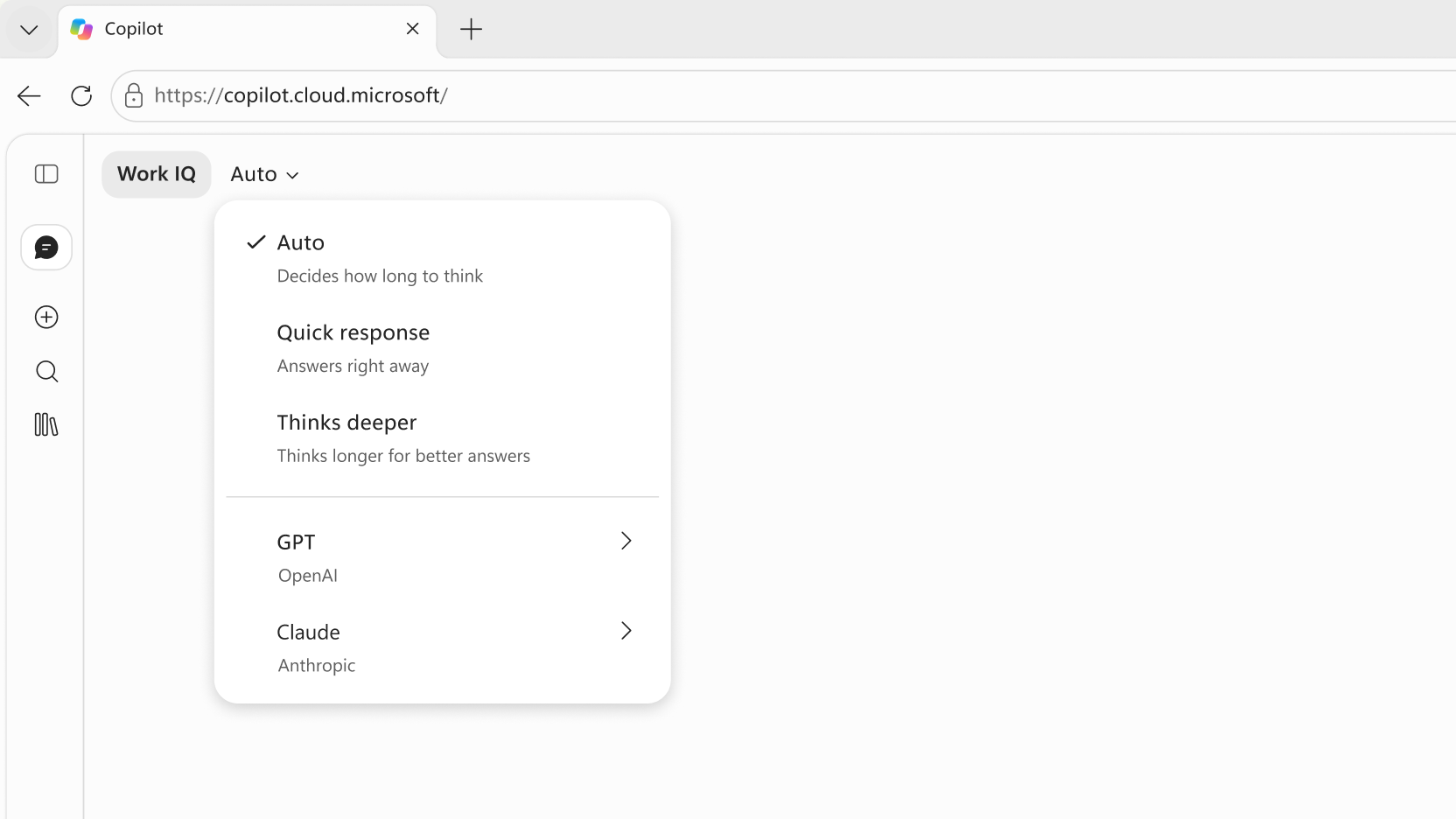
- In Microsoft Copilot with a work account, click Auto at the top of the chat to pick Quick response, Think deeper, or a GPT or Claude model; Claude needs an admin to enable Anthropic.
- Personal Microsoft accounts get modes instead of named models, chosen from the Quick response button under the prompt.
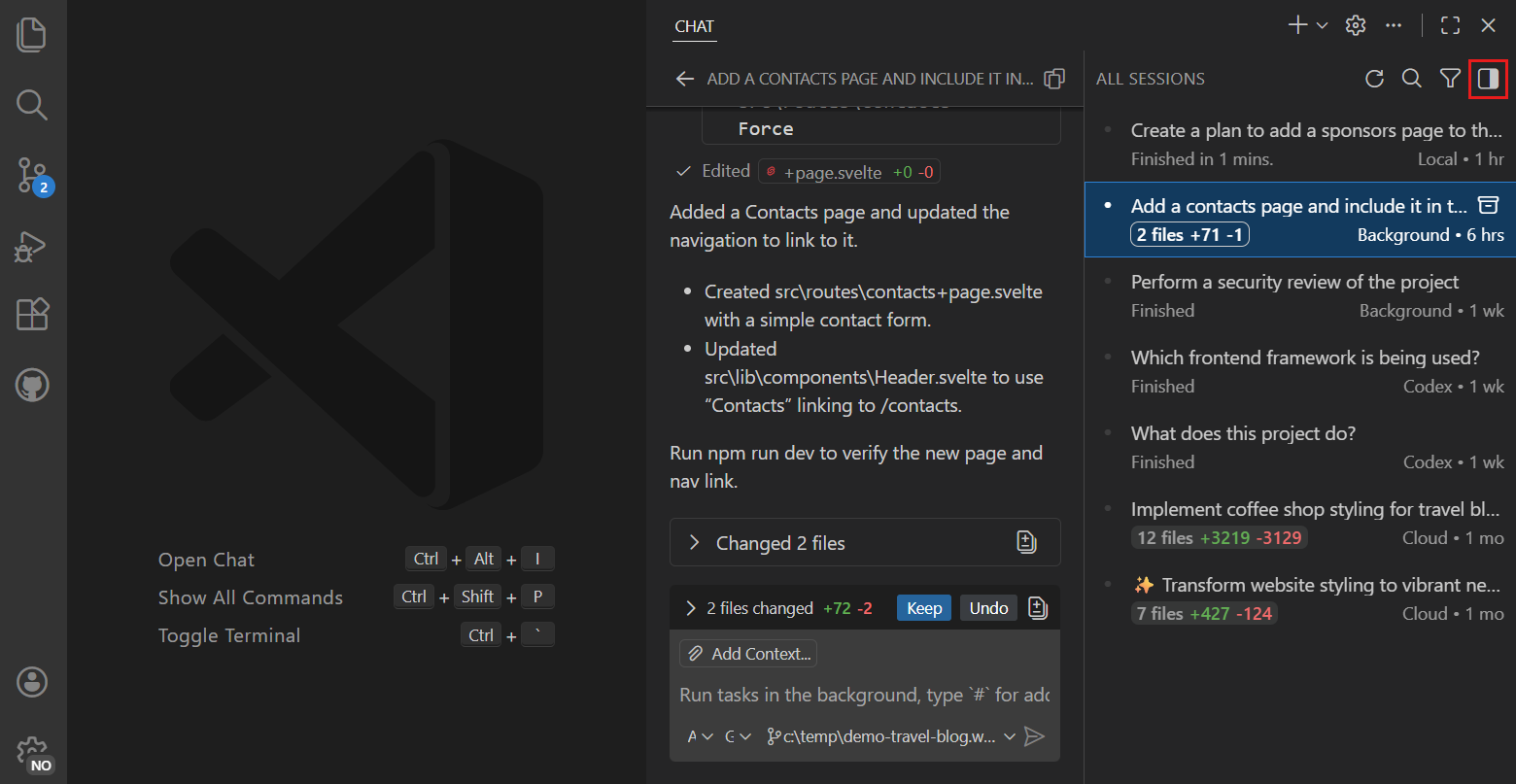
- GitHub Copilot puts the model dropdown at the bottom of the chat box in VS Code and on github.com, and uses /model or --model in the CLI; Copilot Free and Student get Auto only.
Here is how to change model in Copilot. In Microsoft Copilot at work, click the model name at the top of the chat (it says Auto by default) and pick Quick response, Think deeper, or a GPT or Claude model. In GitHub Copilot, open the model dropdown at the bottom of the chat box in VS Code or on github.com, or type /model in Copilot CLI. Your plan and your admin decide what's in the list.
Microsoft Copilot is the assistant in the Copilot app, Word, Excel and PowerPoint. GitHub Copilot is the coding assistant. Our Copilot vs Microsoft 365 Copilot guide explains the split. Everything below comes from Microsoft's and GitHub's help pages, as of November 22, 2026.
Where to change the model in each Copilot
| Where you use Copilot | Where the switch is | What you can pick |
|---|---|---|
| Copilot app, personal account | "Quick response" button under your prompt | Quick response, Think Deeper, Study and learn, Smart, Search |
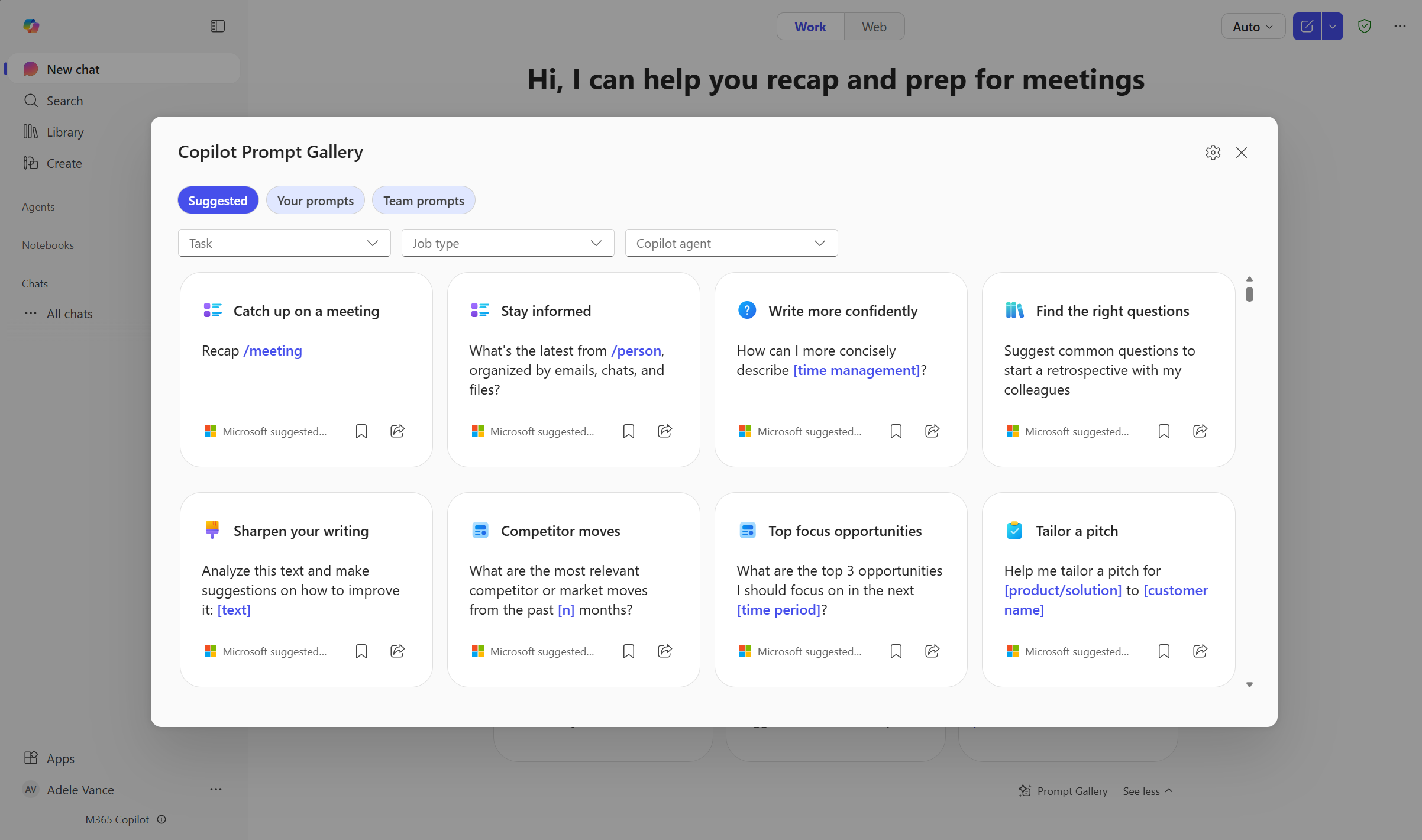
| Copilot app or copilot.cloud.microsoft, work account | Model selector at the top of the chat | Auto, Quick response, Think deeper, GPT models, Claude models |
| Copilot in Excel | Model picker, upper-left of the Copilot pane | Auto, Anthropic and OpenAI models |
| Copilot in PowerPoint | Model switcher in the chat box, or the Settings menu | Auto, ChatGPT, Claude |
| Researcher agent | Model dropdown in Researcher | Auto or Critique, Model Council, GPT, Claude |
| GitHub Copilot in VS Code | Model dropdown at the bottom of the chat view | Copilot Fusion, plus models your plan includes |
| GitHub Copilot on github.com | Model dropdown at the bottom of Copilot Chat | Auto, plus models your plan includes |
| GitHub Copilot CLI | /model command or --model flag |
Auto tiers, plus named models |
How to change the model in Microsoft Copilot with a personal account
With a personal Microsoft account, including Microsoft 365 Personal, Family and Premium, you get modes, not named models. Microsoft's conversation modes help page lists five:
- Quick response: fast, direct answers.
- Think Deeper: "powered by the latest reasoning models from OpenAI."
- Study and learn: explains step by step and can quiz you.
- Smart: uses GPT-5, per the page, and decides how long to think.
- Search: web answers with citations.
To switch:
- Type your prompt into Copilot.
- Before you send it, press or tap Quick response under the prompt.
- Pick the mode you want, then send the prompt.
The mode stays on for follow-ups until you turn it off. Some modes only work when you're signed in.
How to change the model in Microsoft 365 Copilot at work
With a work or school account, Copilot Chat has a model selector. Microsoft's Copilot overview on Microsoft Learn, updated November 17, 2026, says you can pick a model with the model selector, and that by default a real-time router picks the model for each prompt.
- Open the Copilot app or go to copilot.cloud.microsoft and sign in with your work account.
- At the top of the chat, next to Work IQ, click Auto.
- Pick Auto, Quick response or Think deeper. Or open the GPT (OpenAI) or Claude (Anthropic) submenu and choose a specific model.
- Send your prompt.
Microsoft describes the three built-in options like this:
| Option | What it does |
|---|---|
| Auto | Copilot decides which model to use. This is the default. |
| Quick response | A fast, high-throughput model for routine questions. |
| Think deeper | A reasoning model that plans, gathers context and checks its work before a longer answer. |
Since October 6, 2026, the Regenerate action on the web also offers Switch Model, which re-answers your last prompt with another model, per the Microsoft 365 Copilot release notes.
Which models are available on which plan
Microsoft doesn't publish a model-by-license table for Copilot Chat. What it does say:
- On September 22, 2026, Microsoft started rolling out Anthropic's Claude Opus 5.5 and OpenAI's GPT-6 Sol across Word, Excel, PowerPoint, Chat, Cowork and Copilot Studio. It adds: "Availability may vary by license, access, and region."
- Claude models are off until an admin turns them on. Microsoft Learn says Anthropic models work only in some licensed Microsoft 365 experiences and are not on for everyone by default.
- Microsoft's work licenses are Copilot Chat (Basic), Microsoft 365 Copilot (Basic) and Microsoft 365 Copilot (Premium). Microsoft doesn't say which of them get which GPT and Claude entries.
If you see only Auto, Quick response and Think deeper, the named models haven't reached your account or your admin hasn't enabled them. For usage caps, see our Copilot daily limit explainer.
Change the model in Excel
Microsoft's Excel help page says to use "the model picker menu in the upper-left corner of the Copilot in Excel pane." It starts on Auto and lists Anthropic and OpenAI models. It works in Excel for Windows, Mac, iPad and the web.
Your pick lasts only for the current session.
Change the model in PowerPoint
- Open PowerPoint and select Home > Copilot.
- Make sure you're in editing mode.
- Open the model switcher in the chat box. If it isn't there, look in the Settings menu.
- Pick Auto, ChatGPT or Claude, then type your request.
Per Microsoft's PowerPoint page, the switcher needs a commercial Microsoft Copilot subscription, and Claude appears only after your admin enables Anthropic as a sub-processor. When you close PowerPoint, Copilot reverts to Auto.
Change the model in Researcher
Open Researcher under Agents in Chat and use its model dropdown. Per Microsoft's Researcher page, Critique has GPT write and Claude review, Model Council runs both and compares the reports, or you pick GPT or Claude alone. It needs a Microsoft Copilot license, and Model Council needs Microsoft's Frontier preview program.
Admins turn on Claude in the Microsoft 365 admin center, under AI providers for other large language models. Microsoft's June 25, 2026 post on model choice says Microsoft-hosted models stay the default.
How to change the model in GitHub Copilot
You can switch the chat model mid-conversation. Two rules apply everywhere, per GitHub's guide to changing the chat model:
- On Copilot Business, your organization must allow members to switch models.
- Changing the chat model doesn't change the model behind inline suggestions, the gray text that appears as you type.
VS Code
- Click the chat icon in the VS Code title bar to open Copilot Chat.
- At the bottom of the chat view, click the current model's name.
- Pick a model.
You can also pick Copilot Fusion and an effort level. Fusion is a router that picks models for each prompt, per GitHub's Fusion page.
To add models with your own API key, click Manage Models in the same dropdown. On Business and Enterprise, the Bring Your Own Language Model Key in Select IDEs policy must be on.
GitHub.com
At the bottom of Copilot Chat, click the current model's name and pick another. After a reply, click the retry icon under it to regenerate the answer with a different model and compare the two, per GitHub's Copilot Chat on GitHub guide.
Auto lets GitHub choose. On paid plans, GitHub gives a 10% discount on model costs when you use Auto in Copilot Chat or the cloud agent, according to its auto model selection page.
Other editors
Open the chat, then use the model dropdown in its bottom right:
- Visual Studio 2022 17.12 or later: View > GitHub Copilot Chat.
- JetBrains: Copilot icon in the status bar > Open GitHub Copilot Chat. Hover a reasoning model to set Thinking Effort.
- Xcode: Editor > Copilot > Open Chat.
- Eclipse: Copilot icon in the status bar > Open Chat.
Copilot CLI
Type /model in a session to open the picker. By default the change applies only to that session. /model --global makes it the default for future sessions, and /model --repo pins it for the current repository.
To start with a model, pass it as a flag or set an environment variable:
copilot --model=claude-opus-5.5
COPILOT_MODEL=gpt-6.2-sol copilot
Pass auto to let Copilot choose, or use /model auto efficiency, balance or intelligence to pick an Auto tier. --effort sets reasoning effort from low to max. GitHub's CLI command reference lists claude-sonnet-5.5 as the default.
Change the inline suggestions model
In VS Code, press Ctrl+Shift+P (Cmd+Shift+P on a Mac), type change completions model, run GitHub Copilot: Change Completions Model and pick a model. In Visual Studio 17.14 or later, the setting is under Settings > Options > Copilot Completions. Source: GitHub's inline suggestions guide.
Which GitHub Copilot models each plan gets
From GitHub's supported models page, as of November 22, 2026:
| Plan | Models in the picker |
|---|---|
| Copilot Free and Copilot Student | Auto only. No manual model choice. |
| Copilot Pro | Claude Haiku 4.5 and 5.5, Claude Sonnet 5 and 5.5, Gemini 3.8 Flash, Gemini 4 Hydrogen, GPT-5.3-Codex, GPT-5.6 Luna, GPT-6 Luna, GPT-6.1 Terra, Grok 4.5 to 4.7, Kimi K3, MAI Code models |
| Copilot Pro+ | Everything in Pro, plus Claude Opus 5.5, Claude Fable 5 to 5.2, Gemini 4 Argon, Carbon and Neon, GPT-5.6 Sol, GPT-6 Astra and Sol, GPT-6.1 Sol, GPT-6.2 Astra and Sol |
| Copilot Max, Business and Enterprise | Nearly the same list as Pro+. Admins can restrict models for their members. |
On Business and Enterprise, Kimi K3 and the Claude Fable models stay off until an admin enables them. Claude Opus 4.8 was retired on November 16, 2026, and remains only on annual individual plans. Models use AI credits at different rates; see our guide to checking Copilot token usage.
Why you can't see the model picker
- You're on GitHub Copilot Free or Student. Both get Auto only.
- Your organization blocks it. GitHub Business owners must allow switching; Microsoft 365 admins must enable Claude.
- You use a personal Microsoft account. You get modes, not GPT and Claude.
- Your app is old. Visual Studio needs 17.12 or later.
Frequently asked questions
How do I change the model in Copilot to Claude?
In Microsoft Copilot at work, click Auto at the top of the chat and open the Claude submenu; it appears only after your admin enables Anthropic models. In GitHub Copilot, pick a Claude model from the dropdown at the bottom of the chat, or run /model in Copilot CLI. Copilot Free and Student plans can't pick models manually.
How do I change the Copilot completion model in VS Code?
Open the command palette with Ctrl+Shift+P, run GitHub Copilot: Change Completions Model and pick a model. Changing the chat model does not change the inline suggestions model.
How do I change the model in Copilot CLI?
Type /model in a session, or start the CLI with --model=MODEL or the COPILOT_MODEL environment variable. Add --global to /model to make the choice the default for future sessions.
Why does Copilot switch back to Auto?
In Excel and PowerPoint, the model you pick lasts only for the current session, and Copilot returns to Auto when you close the app.
Sources
- What is Microsoft Copilot?Microsoft
- Conversation modes in Microsoft CopilotMicrosoft
- More models, one CopilotMicrosoft
- Choose your model when editing with Copilot in ExcelMicrosoft
- Choose your model when editing with Copilot in PowerPointMicrosoft
- Use model choice in the Researcher agentMicrosoft
- Microsoft 365 Copilot release notesMicrosoft
- Choosing the right AI model in Microsoft 365Microsoft
- Changing the AI model for GitHub Copilot ChatGitHub
- Supported AI models in GitHub CopilotGitHub
- GitHub Copilot CLI command referenceGitHub
- Changing the AI model for GitHub Copilot inline suggestionsGitHub
- Asking GitHub Copilot questions in GitHubGitHub
- About GitHub Copilot auto model selectionGitHub
- About GitHub Copilot FusionGitHub