Key takeaways
- Since November 17, 2026, US users can text Gemini from iMessage or Google Messages after verifying a phone number in Settings, then Channels.
- It requires English, age 18 or older, a personal Google Account and a US number with an eligible carrier.
- Google warns that texts with Gemini are not end-to-end encrypted and may be accessible by your carrier.
You can text Gemini from iMessage on an iPhone, but only in the US, in English, and only after you verify your phone number in Gemini's settings. Google added the option on November 17, 2026, as part of "Text with Gemini", which also works in Google Messages on Android. You text Gemini a task, and it replies in the same thread.
The feature is built for Tasks, Gemini's background agent, which Google made free in six countries the same day. Texting lets you start or steer a task without opening the Gemini app. All details below come from Google's Gemini release notes and its announcement post, read on November 23, 2026.
Who can text Gemini on iMessage
Google's release notes list the requirements:
| Requirement | What Google says |
|---|---|
| Country | US only, for now |
| Language | English |
| Age | 18 or older |
| Account | A personal Google Account, not a work or school one |
| Phone | A verified US phone number with an eligible carrier |
| Apps | Google Messages or iMessage |
| Price | Free; Tasks are free in the US |
Google hasn't published the list of eligible carriers. Its post says the texting runs on an RCS integration, RCS being the newer standard for text messaging.
How to set up Gemini in iMessage
The steps come from Google's announcement:
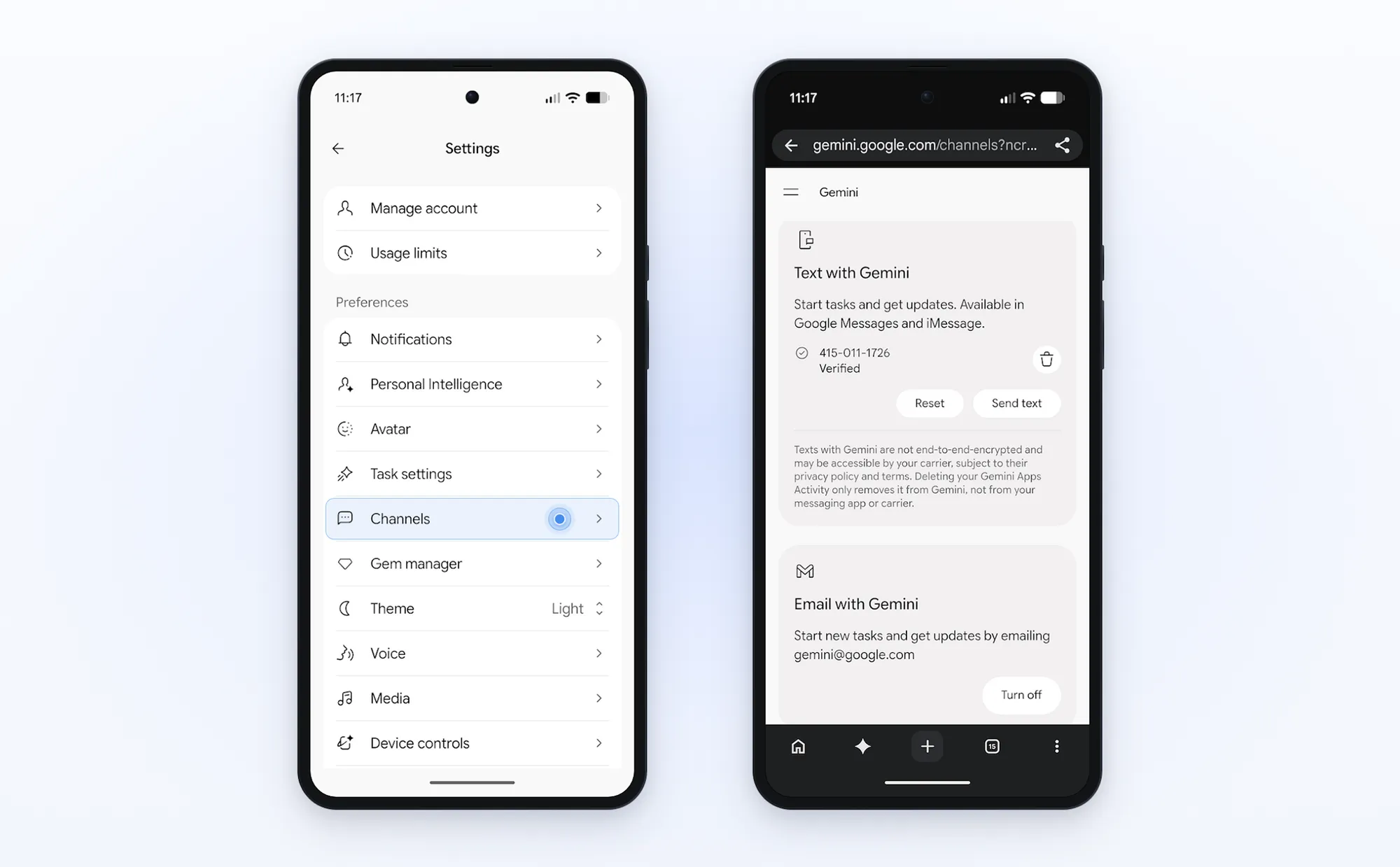
- Open the Gemini app on your iPhone (or Android phone) and tap Settings.
- Tap Channels.
- Under Text with Gemini, tap Set up.
- Verify your phone number.
You can also start at gemini.google.com/channels in a browser, which is the link the release notes give. After you verify, the Channels page shows your number as Verified, with a Send text button to open the conversation and a Reset button.
Once the thread is open, it sits in iMessage like any other chat. Text Gemini what you want done.
What you can do by text
Texting is for Tasks: work Gemini does in the background and reports back on. Google's examples:
- Start a task, such as adding groceries to an Instacart order. In Google's post, the author texted a shopping list, then a photo of a cereal box, and Gemini added both to the order.
- Check on a task that is already running.
- Steer a running task by replying to Gemini's text.
Gemini still asks before it does anything big. The release notes say it "always pauses for your 1-tap confirmation before taking major actions like sending or booking."
Privacy: texts are not end-to-end encrypted
Google's own setup screen carries a warning: texts with Gemini are not end-to-end encrypted and may be accessible by your carrier, subject to the carrier's privacy policy and terms. It also says that deleting your Gemini Apps Activity removes the conversation only from Gemini, not from your messaging app or carrier.
So treat the thread like a text to a business. Don't send passwords, card numbers or anything you wouldn't want your carrier to hold. To remove a conversation completely, delete it in Gemini and in iMessage.
The email option works the same way
The same Channels screen has Email with Gemini. Turn it on, then forward or send messages to gemini@google.com from Gmail, Apple Mail or Outlook to start a task. Gemini replies only to you, not to everyone on the thread, with a link to review the results. It has the same US, English and 18+ limits.
When Gemini doesn't answer your texts
Google has published no troubleshooting page for Text with Gemini yet. Going by its stated requirements, check that:
- You are in the US, your account is a personal Google Account and you are 18 or older.
- Your number shows as Verified on the Channels page. If not, use Reset and verify again.
- Your carrier is eligible. Google says only eligible carriers work, and texting runs over RCS.
- The feature has reached your account. Google says it is rolling out, so it may not appear in Channels yet.
Frequently asked questions
Can you use Gemini in iMessage?
Yes, in the US. Turn on Text with Gemini in the Gemini app under Settings, then Channels, verify your phone number, and Gemini appears as a thread in iMessage.
Is texting Gemini free?
Yes. Text with Gemini starts Tasks, and Google made Tasks free in the US on November 17, 2026.
Are texts with Gemini private?
Not fully. Google's setup screen says texts with Gemini are not end-to-end encrypted and may be accessible by your carrier, and deleting Gemini activity does not remove them from your messaging app.
Does Gemini in Google Messages work the same way?
Yes. Text with Gemini works in Google Messages and iMessage with the same setup and the same US-only, English-only limits.