Key takeaways
- Claude Meetings started rolling out in beta on November 12, 2026 for Claude Team and Enterprise plans, on Google Meet only.
- You add Claude from claude.ai/meetings or turn on auto-join under Settings > Capabilities > Meetings.
- Claude saves a transcript, summary and screen descriptions but no audio, and docs and whiteboards made in meetings are free through February 10, 2027.
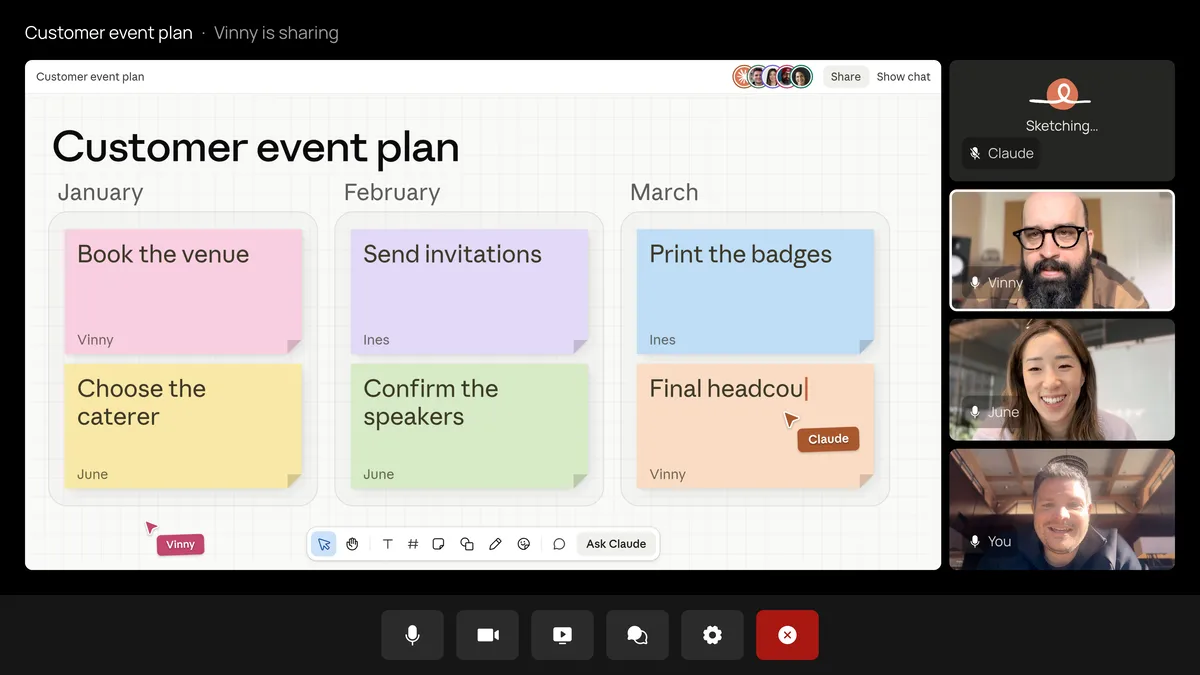
Claude Meetings is a beta feature that adds Claude to a Google Meet call as a visible participant. It takes notes, answers questions when you say "Claude," and can make docs, whiteboards and slides while the call is running. It started rolling out on November 12, 2026 for Claude Team and Enterprise plans, according to Anthropic's release notes. This guide covers how to turn it on, how to add Claude to a meeting, what it does with your data, and what it costs, all from Anthropic's help article Use Claude Meetings, as of November 14, 2026.
Who can use Claude Meetings
| Team plan | Enterprise plan | |
|---|---|---|
| Claude Meetings | On by default; an owner can turn it off | Off by default; an owner turns it on for everyone or for chosen roles |
| Calls with outside guests | Allowed by default | Internal meetings only until an owner allows guests |
| Meeting platform | Google Meet | Google Meet |
You need three things: a Team or Enterprise plan, an owner who has enabled Google Calendar for your organization, and your own Google Calendar connected to Claude. It works in Claude on the web and in Claude Desktop.
During the beta, it is not available to organizations that use zero data retention, a HIPAA-ready configuration or customer-managed encryption keys. Free, Pro and Max plans don't have it.
How to turn on Claude Meetings (owners)
- Open Organization settings > Products > Claude Meetings (beta). Owners and Primary Owners can see this page; on Enterprise, so can a custom role with Owner access.
- Set Claude Meetings to on for everyone, or on for roles that include Meetings.
- Set Meetings with external guests to internal meetings only, or allowed.
- Decide on Members' connectors in meetings, which controls whether Claude can use people's connected tools, such as Slack, during a call.
How to add Claude to a Google Meet call
There are two ways.
Add Claude to one meeting:
- Go to Meetings in Claude, at claude.ai/meetings.
- Connect your Google Calendar if you haven't.
- Pick the meeting from your calendar.
- Click Add Claude.
Have Claude join automatically:
- Go to Settings > Capabilities > Meetings > Auto-join.
- Choose all your meetings, or all meetings except one-on-ones.
An owner can't turn on auto-join for you. Anthropic asks that you check everyone on the call is fine with being transcribed before you add Claude.
Claude usually joins on its own. If Meet asks the host to admit it and the host declines, Claude won't try again unless someone adds it again.
What you can do during the call
- Ask a question. Say "Claude" and then the question, or type it in the Meet chat. Claude answers in writing in the Meet chat by default.
- Make something. Say "Claude, make a doc" or "Claude, make a whiteboard." Anyone on the team can ask. Claude attaches what it makes to the meeting page.
- Use your tools. Claude can act through each person's connected tools, such as sending a Slack message, with that person's permission. It asks the first time. When someone asks out loud, it asks each time to confirm who is speaking.
- See what it is doing. Claude's video tile shows its current state.
- Pause it. Ask Claude to stop listening, or pause it from the meeting page. Resume from the meeting page.
- Open the meeting page. Claude posts a link in the Meet chat when it joins. The page has the live transcript, a private chat for your organization and everything Claude made.
Anything Claude writes in the Meet chat is visible to everyone on the call.
How to remove Claude from a meeting
Ask Claude to leave, or click Remove Claude on the meeting page. If you add it back, it returns to the same page. Claude can stay up to eight hours and warns you before it leaves.
What happens after the call
The meeting page keeps the summary, action items, the transcript and everything Claude made. People from your organization on the invite get a recap email with a link, can read the notes and can edit what Claude made. You can share the page with others in your organization, and ask Claude about past meetings you can access from a normal chat.
Privacy: does Claude Meetings record audio
No. Claude saves a transcript, a summary and descriptions of what was on screen, but not the audio. It joins as a visible participant and posts a notice in the call chat.
With outside guests blocked, Claude won't join a call that has outside invitees, and it leaves if an outsider joins later, including another company's notetaker bot. With guests allowed, it takes notes and posts its notice but doesn't reply in the chat, and guests don't get the meeting page or the recap email.
How much Claude Meetings costs
Notes, transcripts and answers that don't use connected tools are included in Team and Enterprise plans. Docs and whiteboards made in a meeting are free through February 10, 2027. Using connected tools counts toward your own usage and can add charges for your organization.
Common problems
- No Meetings page or Add Claude button: your plan isn't Team or Enterprise, an Enterprise owner hasn't turned it on for your role, or your organization uses ZDR, HIPAA-ready settings or CMEK.
- Claude didn't join: the host may have declined it, or the call has an outside guest and your organization allows internal meetings only.
- Claude left mid-call: someone from outside your organization joined, or the call passed eight hours.
- No calendar meetings listed: an owner has to enable Google Calendar for the organization before you can connect yours.
Claude Meetings works only with Google Meet for now; Anthropic hasn't named a date for Zoom or Teams. For more on Claude's work tools, see our Claude Code vs Cowork comparison.
Frequently asked questions
Is Claude Meetings free?
Notes, transcripts and answers are included in Team and Enterprise plans, and docs and whiteboards made in meetings are free through February 10, 2027. Using connected tools counts toward your usage.
Does Claude Meetings work with Zoom or Microsoft Teams?
Not yet. Anthropic's help article covers Google Meet only.
Does Claude Meetings record audio?
No. It keeps a transcript, a summary and descriptions of what was on screen, but it does not save audio.
Can Claude Pro or Max users use Claude Meetings?
No. The beta is for Team and Enterprise plans only.
Sources
- Use Claude MeetingsAnthropic
- Claude release notesAnthropic