Key takeaways
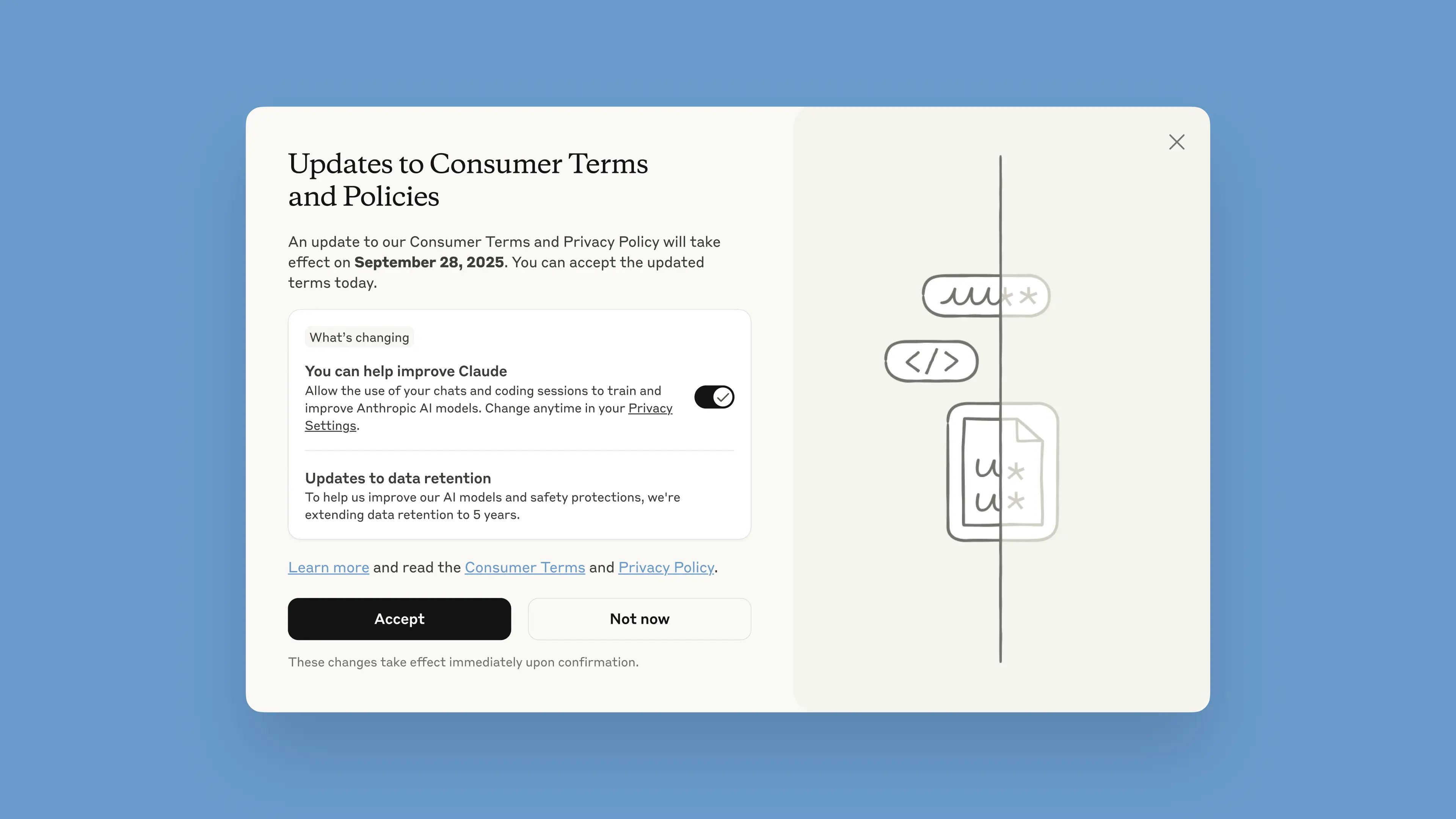
- On Free, Pro, Max and Ultra, Anthropic trains on chats only when Help improve our AI models is on, and allowing it extends retention to up to 5 years.
- Deleted chats leave Anthropic's back-end storage within 30 days, and incognito chats are never used for training but are kept for 30 days by default.
- Anthropic's commercial terms bar training on Team, Enterprise and API data, which is covered by ISO 27001, ISO/IEC 42001 and SOC 2 Type II.
Is Claude safe for everyday chats: mostly yes, if you check one setting. On personal Claude plans, Anthropic trains on your chats only when the model-improvement setting is on, deletes removed chats from its systems within 30 days, and keeps business and API data out of training entirely. The real risks sit elsewhere: the five-year retention that comes with saying yes to training, and the agent features that read web pages and connected apps, where hidden instructions can steer Claude.
Everything below comes from Anthropic's privacy policy, terms and help center as of November 24, 2026. It is general information, not legal advice. If you are new to the product, start with what Claude is.
Is Claude safe: the short version
| Question | Answer as of November 24, 2026 |
|---|---|
| Are my chats used to train models? | On Free, Pro, Max and Ultra, only if "Help improve our AI models" is on. You can switch it off any time. Team, Enterprise and API data is not used. |
| How long are chats kept? | Until you delete them. Deleted chats leave Anthropic's back-end storage within 30 days. |
| How long if I allow training? | De-identified chats can stay in training pipelines for up to 5 years. |
| Do incognito chats leave a trace? | They stay out of your history and memory and are never used for training, but are kept for 30 days by default. |
| Can I set a password or MFA? | No password exists. You sign in with Google or an emailed link, so your email account is the lock. |
| Security certifications | ISO 27001:2022, ISO/IEC 42001:2023, SOC 2 Type I and Type II, and a HIPAA-ready setup, for the business products |
| Minimum age | 18 |
What Claude stores, and for how long
Anthropic's privacy policy, effective September 10, 2026, says it collects what you type and upload, the outputs Claude writes, data from apps you connect, your name, email, phone number and payment details, plus your IP address, device details and usage logs. The policy says Anthropic's services are not meant for anyone under 18.
How long each kind of data lasts on personal plans, according to Anthropic's retention article:
| Data | How long Anthropic keeps it |
|---|---|
| Regular chats | As long as reasonably necessary, which in practice means until you delete them |
| Deleted chats | Gone from your history at once, deleted from back-end storage within 30 days |
| Chats used for training (setting on) | Up to 5 years, de-identified |
| Chats flagged for a Usage Policy violation | Inputs and outputs up to 2 years, safety classification scores up to 7 years |
| Thumbs up, thumbs down and bug reports | 5 years, with the whole conversation |
| Incognito chats | 30 days by default |
Anthropic can also keep data longer when the law requires it or to resolve disputes. Note the feedback line: rating one answer hands over the full conversation for five years, whatever your training setting.
Does Claude train on your chats
Since a change Anthropic announced on August 28, 2025, personal accounts choose whether their chats and coding sessions train Anthropic's models. New users pick at sign-up. Existing users were asked to choose by October 8, 2025. The change covers Free, Pro and Max, and Claude Code used from those accounts; the help center now lists Ultra alongside them.
The consumer terms say Anthropic may train on your chats "unless you opt out of training through your account settings." Two things override the opt-out: feedback you send, and chats flagged for safety review.
How to turn training off, from Anthropic's privacy settings article:
- On the web or desktop app, click your name and open Settings.
- Select Privacy, or go straight to claude.ai/settings/data-privacy-controls.
- Under Help improve our AI models, switch the toggle off.
On iPhone and Android, the path is the same: your name, Settings, Privacy.
What switching it off does and doesn't do:
- New chats and coding sessions stop being used for training.
- Chats you had before are excluded from future training runs.
- Data already in a training run that started, or in a model already trained, stays there.
What goes into training when the setting is on: the whole conversation, your custom styles and preferences, and data from Claude in Chrome, according to Anthropic's training article. Raw content from connectors such as Google Drive is left out unless you paste it into the chat. Anthropic says it filters or obscures sensitive data before training and does not sell user data to third parties.
Incognito chats: what they hide and what they don't
An incognito chat is a conversation that never enters your chat history or memory and is never used for training, even with the training setting on. It works on every plan.
To start one, open a new chat outside a project and click the ghost icon in the upper right. A black border and an "Incognito chat" label show you're in one.
The limits:
- Anthropic still keeps the chat for 30 days by default, and Enterprise organizations can set longer.
- On Team and Enterprise plans, account owners can see incognito chats in data exports, and Enterprise includes them in the Compliance API.
- You can't turn an incognito chat into a regular one or reopen it once closed.
- It isn't available inside projects, and on the new Claude experience it can't create files or run code.
How to delete chats and your Claude account
Deleting a chat removes it from your history at once and from Anthropic's back end within 30 days. Our guide on how to delete chats in Claude has the steps for single and bulk deletion.
To delete the whole account, from Anthropic's account deletion article:
- If you pay for Pro, Max or Ultra, cancel in Billing settings and wait for the billing period to end.
- Export your data from the web or desktop app if you want to keep it.
- On the web, click your name in the lower left, then Settings, Account, Delete account.
On iPhone, it is Settings, Profile, Delete account. On Android, open the menu, tap your initials, then Profile and Delete Account. Deletion is permanent, and any unused usage credits go with it. Some accounts have to go through support; the settings page will say so.
How Team, Enterprise and the API differ
Anthropic's commercial terms are blunt: "Anthropic may not train models on Customer Content from Services." That covers Claude for Work (Team and Enterprise) and the API. The 2025 training choice never applied to them, nor to Claude for Government, Claude for Education, or Claude through Amazon Bedrock or Google Cloud Vertex AI.
Retention differs too, according to Anthropic's commercial retention article:
| Personal plans | Team and Enterprise | API | |
|---|---|---|---|
| Used for training | Only if the setting is on | No | No |
| Default retention | Until you delete | Until you delete, then within 30 days | Deleted within 30 days |
| Flagged for policy violations | Up to 2 years | Up to 2 years | Up to 2 years |
Enterprise organizations can set custom retention, and zero data retention is available by separate agreement. The trade-off at work is the same as anywhere: your employer's admins can export your chats, including incognito ones.
Security certifications
Anthropic lists its certifications on its Trust Center and in a help article that covers Claude for Work and the API:
- ISO 27001:2022, for information security management
- ISO/IEC 42001:2023, for AI management systems
- SOC 2 Type I and Type II, independent audits of security controls
- A HIPAA-ready configuration, with a business associate agreement available
The article says these cover the commercial products, and points personal plans to separate guidance.
Account security is simpler than the certifications suggest. Claude has no password: you sign in with Google or a link sent to your email, according to its login article, and that article mentions no two-factor option or passkeys. Whoever controls your inbox or Google account controls your Claude account, so turn on two-step sign-in there.
The real risks: Chrome, computer use and connectors
The bigger risk is Claude acting for you. A prompt injection is text hidden in a web page, email or document that tries to make the AI follow someone else's orders.
Claude in Chrome. The browser extension became generally available on every paid plan on August 26, 2026. Anthropic says that, in tests by professional red-teamers, no attack succeeded against Claude Sonnet 5, Opus 5 or Mythos 5 with its probes and safety classifier on, and 0.3% succeeded against Fable 5. These are Anthropic's own numbers. Its safety guide still says "The risk is not zero," and that a successful attack could leak data. Claude asks before opening financial sites and is blocked from stock trading and solving CAPTCHAs. Anthropic advises a separate browser profile with no banking, health or government logins, and stopping the task if Claude visits pages you didn't expect.
Computer use. For developers giving Claude control of a desktop through the API, Anthropic's computer use docs warn that instructions on web pages or in images "might override your instructions." They recommend a virtual machine with minimal privileges, no login details, a list of allowed sites, and a human confirming anything with real consequences. Classifiers scan screenshots for injections by default.
Connectors. Connectors let Claude read and write in apps like Google Drive or your own tools. Anthropic's custom connectors guide warns that "Malicious MCP servers may include hidden instructions" and notes that custom connectors can reach services Anthropic hasn't verified. During Research, Claude can call connector tools without asking, so turn off tools that can write before you start one. Choose "Allow always" only for tools you trust to run unsupervised.
The same reasoning applies to Cowork, Claude's desktop agent; our article on whether Claude Cowork is safe covers its folder access and sandbox.
How to make Claude safer: a checklist
- Decide on training. Switch off Help improve our AI models if you don't want five-year retention.
- Skip the thumbs buttons on sensitive chats. Feedback keeps the whole conversation for five years.
- Use incognito for one-off sensitive questions, and remember it still lasts 30 days.
- Delete what you don't need. Deleted chats leave Anthropic's back end within 30 days.
- Lock down your email or Google account with two-step sign-in, because that is your Claude login.
- Keep secrets out of prompts. Passwords, card numbers and ID numbers don't belong in a chat.
- Give agents a clean browser profile and approve actions on unfamiliar sites by hand.
- Connect only trusted apps, with the narrowest permissions they will accept.
The training setting is the one that changes the most. With it off, a deleted chat is gone within 30 days. With it on, a de-identified copy can last five years.
Frequently asked questions
Is Claude safe for sensitive data?
It is safer with the training setting off, because chats then stay only until you delete them plus up to 30 days. Chats you rate with thumbs up or down are kept for 5 years, so keep passwords, card numbers and ID numbers out of prompts.
Is Claude safe to use at work?
Anthropic's commercial terms say it may not train on Team, Enterprise or API data, and those products hold ISO 27001, ISO/IEC 42001 and SOC 2 Type II certifications. On Team and Enterprise, account owners can export members' chats, including incognito ones.
Is Claude safe for privacy?
Anthropic says it does not sell user data and filters or obscures sensitive data before training. You control training in Settings, Privacy, and incognito chats stay out of your history, memory and training.
Is Claude safe to connect to Gmail?
Connectors use OAuth, so Claude never sees your password, but Anthropic warns that malicious tools and content can carry hidden instructions. Grant the narrowest permissions and review actions before approving them.
Sources
- Privacy policyAnthropic
- Consumer terms of serviceAnthropic
- Updates to consumer terms and privacy policyAnthropic
- How long do you store my data?Anthropic
- How do I change my model improvement privacy settings?Anthropic
- Is my data used for model training?Anthropic
- Using incognito chatsAnthropic
- How do I delete my Claude account?Anthropic
- Commercial terms of serviceAnthropic
- How long do you store my organization's data?Anthropic
- What certifications has Anthropic obtained?Anthropic
- Anthropic Trust CenterAnthropic
- Log in to your Claude accountAnthropic
- Claude in Chrome is generally availableAnthropic
- Use Claude in Chrome safelyAnthropic
- Computer use toolAnthropic
- Get started with custom connectors using remote MCPAnthropic