Key takeaways
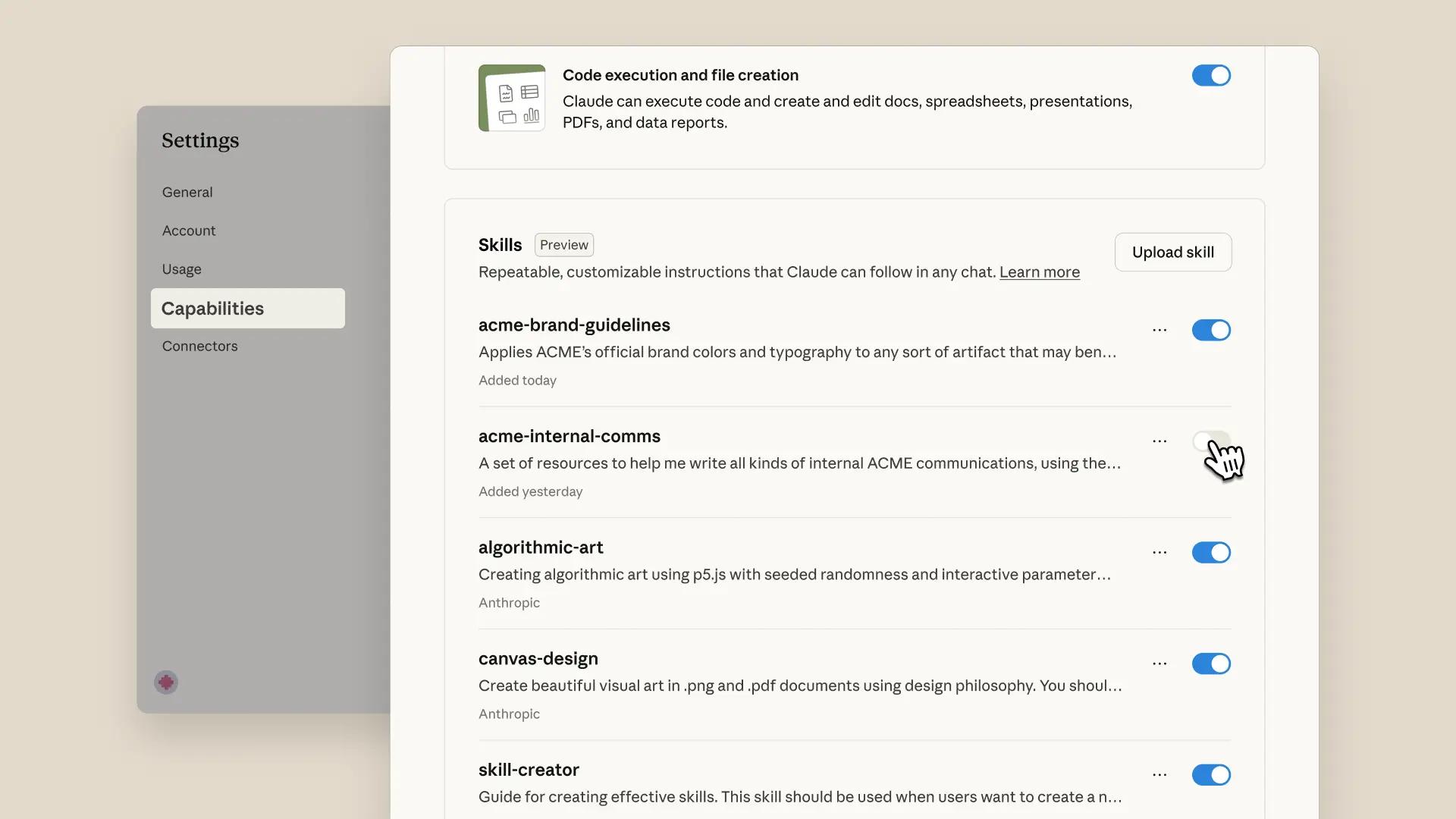
- Skills in the Claude apps need code execution turned on in Settings > Capabilities, then each skill is toggled on in Customize > Skills, now called Plugins on individual plans.
- Claude picks a skill by matching your request to its description, and you can force one by naming it or choosing it with / or the + button.
- In Claude Code, typing /skill-name at the start of a message runs the skill, and skills enabled on claude.ai sync to the terminal on version 2.1.273 or later.
How to use a skill in Claude comes down to three steps: turn on code execution, switch the skill on, then ask for the task in plain words. Claude reads the short descriptions of your enabled skills and loads the one that fits. To force a specific skill, name it in your request or pick it with /. In Claude Code, type /skill-name at the start of a message. These steps come from Anthropic's Use skills in Claude help article and the Claude Code skills docs, as of November 24, 2026.
This guide covers using skills that already exist: Anthropic's built-in ones, ones you download or get from colleagues, and ones you wrote earlier. To write your own, see the guide to creating a skill in Claude.
What a skill is, in one paragraph
A skill is a folder of instructions, and sometimes scripts and templates, that teaches Claude one repeatable task. Anthropic's Agent Skills docs describe how it loads in stages. Claude always sees each skill's name and description, about 100 tokens per skill. It reads the full instructions only when a request matches, so many skills can stay switched on at little cost.
Which Claude plans have skills
The help center lists skills on the Free, Pro, Max, Ultra, Team and Enterprise plans, as of November 24, 2026. Every plan needs code execution turned on, because skills run in Claude's code environment.
| Plan | Who turns skills on | Where |
|---|---|---|
| Free, Pro, Max, Ultra | You | Settings > Capabilities, then Customize > Skills |
| Team | On by default for the organization | Members toggle skills in Customize > Skills |
| Enterprise | An owner first, then each member | Organization settings > Plugins & skills > Policy |
Anthropic's developer docs are narrower on one point: they list custom skill uploads in claude.ai for Pro, Max, Ultra, Team and Enterprise, without Free.
How to turn on skills in the Claude apps
On a Free, Pro, Max or Ultra plan:
- Open Settings > Capabilities.
- Turn on Code execution and file creation. In the updated Settings layout it is called Create and edit files.
- Go to Customize > Skills.
- Switch on the skills you want with the toggle next to each one.
On a Team or Enterprise plan, an owner goes to Organization settings > Plugins & skills, opens the Policy tab and checks that both Code execution and file creation and Skills are on. Members can then toggle skills in Customize > Skills.
The menu name is changing. According to a help article on the new Plugins page, Customize now reads Plugins in the sidebar on Free, Pro, Max and Ultra plans. Team plans get the change from November 30, 2026, and Enterprise plans in the weeks after. On the new page, use the quick filter to show only skills. Your installed skills stay installed.
How to use Anthropic's built-in skills
Anthropic ships skills for four kinds of files:
- Excel spreadsheets
- Word documents
- PowerPoint presentations
- PDFs
You don't call these by name. With code execution on, Claude picks them up when the request fits. The help center's example is "Create a PowerPoint presentation about Q3 results", which makes Claude use the PowerPoint skill.
More skills are in the directory. Go to Customize > Skills, click +, then Browse skills, and click Add on the one you want. It is switched on as soon as it is added. Directory skills are view-only.
How to upload a custom skill
If someone sends you a skill folder, or you built one, upload it as a ZIP:
- Zip the skill folder. The folder name must match the skill name, and it must contain the skill file.
- Go to Customize > Skills.
- Click +, then + Create skill.
- Select Upload a skill and choose the ZIP.
- The skill appears in your list. Check that its toggle is on.
Uploads usually fail because the ZIP is too large, the folder name doesn't match the skill name, or the skill file is missing.
On Team and Enterprise plans, skills a colleague shares with you appear under Shared with you and stay off until you toggle them on.
Read any skill from outside your company before you switch it on. Anthropic's docs name prompt injection and data leaks through malicious code as the main risks, and advise installing skills only from trusted sources.
How Claude decides to use a skill
When you send a request, Claude compares it with the descriptions of your enabled skills and loads the ones that match. Anthropic's developer docs say the description is "what Claude matches your request against". A skill with a vague description gets used less often, however good its instructions are.
You can make the choice for Claude in three ways:
- Name the skill in your request. The help center suggests wording like "Use my brand guidelines skill to create a presentation".
- Pick it from the menu. On the new Plugins layout, click the + button or type / in the chat box to choose a skill.
- Turn off skills you don't want. A disabled skill isn't available to Claude at all.
In the Claude add-ins for Excel, PowerPoint, Word and Outlook, your enabled skills are available too. Type / in the sidebar to pick one, or describe the task and let Claude choose.
How to use skills in Claude Code
Claude Code treats skills as commands. Type / and the menu lists them, with built-in commands. Type the name at the start of your message to run one:
/fix-issue 123
Everything after the name is passed to the skill as its arguments. Position matters. At the start of the message the skill runs directly. Later in a sentence, such as go ahead and /deploy to staging, the name only gives Claude permission to run it, and Claude judges from your wording whether to. To mention a skill without allowing a run, leave off the slash.
At the terminal prompt you can stack skills: /write-tests /fix-issue 123 loads both and passes 123 to each.
If you don't type a name, Claude can still load a skill on its own when your request matches the description. Some skills are set to run only when you type them, usually ones with side effects such as deploys.
Skills that come with Claude Code
Claude Code ships with bundled skills, including /doctor, /code-review, /batch, /debug, /loop and /claude-api. One of them is covered in our guide to Claude Code verification and the /verify skill.
Where Claude Code looks for skills
| Location | Path | Loads in |
|---|---|---|
| Personal | ~/.claude/skills/<skill-name>/SKILL.md |
All your projects on that machine |
| Project | .claude/skills/<skill-name>/SKILL.md |
Sessions in that repository |
| Plugin | <plugin>/skills/<skill-name>/SKILL.md |
Wherever the plugin is on, as /plugin-name:skill-name |
| claude.ai account | Skills enabled on claude.ai | Terminal sessions signed in with that account, Cowork and cloud sessions |
To use a skill folder someone gave you, copy it into one of the first two paths. Claude Code watches those folders and picks up changes during the session. If a new skill doesn't show up, run /reload-skills.
To install Anthropic's open-source skills, the anthropics/skills repository gives these commands:
/plugin marketplace add anthropics/skills
/plugin install document-skills@anthropic-agent-skills
After that, the README says, you can call a skill by mentioning it, such as asking Claude Code to "Use the PDF skill" to pull the form fields out of a PDF.
Use your claude.ai skills in the terminal
Skills you enabled on claude.ai also load in Claude Code when you sign in with the same account, on version 2.1.273 or later. Run /skills to see them under claude.ai sync. The sync is one-way and doesn't run when you sign in with an API key or use a cloud provider such as Amazon Bedrock. If a synced skill shares a name with a local one, /name runs the local skill and /anthropic-skills:name runs the synced one. To switch syncing off, set syncClaudeAiSkills to false in your settings.
How to use skills through the Claude API
Developers attach skills per request. The Agent Skills docs say to list each skill's type and skill_id in container.skills and to include the code execution tool. The built-in IDs are pptx, xlsx, docx and pdf. Custom skills are uploaded through the /v1/skills endpoints. Skills uploaded to claude.ai are not available in the API, and the reverse is also true.
Why Claude is not using your skill
In the Claude apps, the help center gives these checks:
- The skill's toggle is on in Customize > Skills.
- Code execution is on. If the Skills section is missing or skills are greyed out, it is off, for you or for your organization.
- The skill's description says clearly when to use it.
- Your request names the skill.
In Claude Code, the docs suggest asking What skills are available? to confirm the skill loaded, rephrasing your request closer to the description, and running /skill-name directly. If the frontmatter (the settings block at the top of SKILL.md) is broken, the skill still runs from /skill-name, but Claude can't match it to requests.
claude plugin validate finds broken skill files. It was run for this guide on Claude Code 2.1.331 against a test .claude/skills folder. A valid skill printed Validation passed. A skill with a broken description line printed "YAML frontmatter failed to parse" and warned that the skill would load with all its settings dropped.
claude plugin validate .claude/skills
claude plugin validate ~/.claude/skills
What to do next
Switch on the built-in document skills first and ask for a spreadsheet or a deck to see one work. Then add one skill for a task you repeat every week, and test it with a few different prompts. If nothing in the directory fits, build your own skill. Owners on Team and Enterprise plans should check the Skills setting before November 30, 2026: from that date, turning Skills off also blocks plugins in Claude Desktop.
Frequently asked questions
Can I use Claude skills for free?
Anthropic's help center lists skills on the Free plan as well as Pro, Max, Ultra, Team and Enterprise, as of November 24, 2026. Code execution must be turned on in Settings > Capabilities.
How do I force Claude to use a skill?
Name it in your request, for example "Use my brand guidelines skill to create a presentation", or pick it from the menu that opens when you type / or click + in the chat box. In Claude Code, type /skill-name at the start of your message.
How do I use skills in Claude Code?
Put skill folders in ~/.claude/skills/ for all your projects or .claude/skills/ for one repository, then type / to see them or let Claude load them when your request matches. Run /skills to see the list, including skills synced from claude.ai.
Why is Claude not using my skill?
Check that the skill is toggled on, that code execution is enabled, and that the skill's description says clearly when to use it. Naming the skill in your request or running /skill-name in Claude Code confirms it loads.
Sources
- Use skills in ClaudeAnthropic
- Extend Claude with skillsAnthropic
- Agent SkillsAnthropic
- What are skills?Anthropic
- Manage plugins, skills, and connectors from one Plugins pageAnthropic
- Browse skills, connectors, and plugins in one directoryAnthropic
- Introducing Agent SkillsAnthropic
- anthropics/skillsAnthropic