Key takeaways
- Smart Window is an optional AI window in desktop Firefox, in beta in the U.S., Canada and France according to Mozilla.
- To try it, update Firefox and start from firefox.com/smart-window; other regions can sign up to be notified.
- On October 27, 2026 Mozilla added form filling and /watch website monitoring, in English in the U.S. and Canada only.
Firefox Smart Window is an optional, AI-powered window in Firefox, and you turn it on by installing the latest desktop Firefox and starting from Mozilla's Smart Window page. It is still in beta. Mozilla says it is available in the U.S., Canada and France, and people elsewhere can sign up on the same page to be told when it reaches them.
On October 27, 2026, Mozilla added two features to the beta: form filling and website monitoring. Both are limited to English in the U.S. and Canada for now.
What Firefox Smart Window is
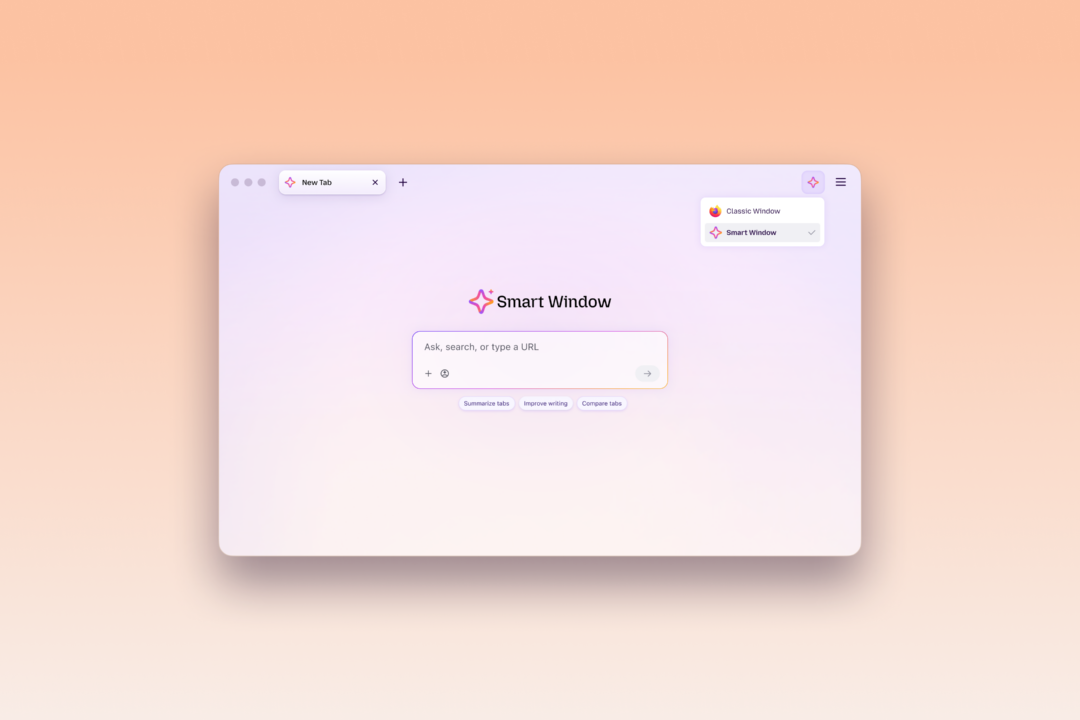
Smart Window sits next to the Classic and Private windows. Mozilla describes it as an optional window type with an assistant that can summarize pages, compare information and plan tasks using your open tabs. You choose when to use it. Classic and Private windows stay available from the Firefox menu.
Mozilla's launch post of August 18 listed three early features:
- Answers with sources, powered by a partnership with the search company Exa, so you do not have to leave the page for a results list.
- Suggested groups for related tabs, and one-click closing of duplicate tabs.
- Visual previews of pages in your browsing history.
Mozilla's page also says you can pick from three AI models or bring your own, and that optional "memories" are stored on your device, not on Mozilla's servers.
How to turn on Firefox Smart Window
Mozilla's posts do not give a step-by-step settings path, so this is what its pages say.
- Use Firefox on a desktop computer. The Smart Window page says the feature is desktop only.
- Update to the latest Firefox release. The page says you need it.
- Open firefox.com/smart-window and follow its prompt to try Smart Window. If your region is not supported yet, use the sign-up on that page instead.
- Open a Smart Window from Firefox. Mozilla's own image of the feature shows a toolbar button with a menu that lists Classic Window and Smart Window.
Mozilla says Firefox's AI Controls is the single place to manage Smart Window, including turning it off entirely. This was checked on October 28, 2026. Availability and steps may change while the feature is in beta.
Form filling in Smart Window
Click into a form field and choose "Fill from sources". Smart Window then suggests entries for the text fields using pages you pick, such as a portfolio or a professional profile. The option appears when the form has at least four fillable text fields. You review the result, and Mozilla says Smart Window "won't submit the form for you."
Mozilla lists these limits: dropdowns and PDF forms are not supported yet, and the generated data is not saved. Saved autofill values such as your name and address do not use AI and stay on your device. Form filling does send content from the pages you select to Google's Gemini 3.1 Flash Lite model, which Mozilla says it uses to find fields and extract information.
Website monitoring with /watch
Type "/watch" in the Smart Window chat, describe what you want to track, add pages and choose daily or weekly checks. Matches appear under the Tasks button in the toolbar. Desktop notifications are optional.
| Limit | Value |
|---|---|
| Pages per task | 5 |
| Active tasks | 15 |
| When checks run | Only while Firefox is open |
| Auto-pause | After 60 days without a matching change |
| Auto-stop | After 90 days without a change |
Mozilla says page monitoring uses the Qwen model, and that your chat model choice does not change.
What we don't know yet
Mozilla has not said when Smart Window leaves beta, or which markets get the October 27 features, beyond "the coming months". Its post does not describe privacy handling for page monitoring beyond naming the model. Earlier coverage of Smart Window is in the Firefox window types post, published September 24, 2026.
Frequently asked questions
Is Firefox Smart Window available in my country?
Mozilla says the beta is available in the U.S., Canada and France. Elsewhere you can sign up on firefox.com/smart-window to be notified. The October 27 features are English only, in the U.S. and Canada.
How do I turn off Firefox Smart Window?
Mozilla says Firefox's AI Controls is the single place to manage Smart Window, including turning it off entirely. Classic and Private windows stay available either way.
Does Firefox Smart Window submit forms for me?
No. Mozilla says Smart Window won't submit the form for you. It suggests entries from pages you pick, and you review them first.
How does Firefox Smart Window website monitoring work?
Type /watch in the Smart Window chat, describe what to track and add up to 5 pages per task. Checks run daily or weekly, only while Firefox is open, and you can have 15 active tasks.