Key takeaways
- AWS launched AWS Emulator on November 11, 2026 to run AWS APIs locally for development and testing, with no service fee and no AWS account needed.
- It installs from RPM or Debian packages on Linux and runs in a Docker image you build yourself on macOS and Windows, listening on 127.0.0.1:9297.
- It doesn't evaluate IAM policies or support multiple accounts or Regions, and AWS publishes per-service fidelity scores showing how closely it matches AWS.
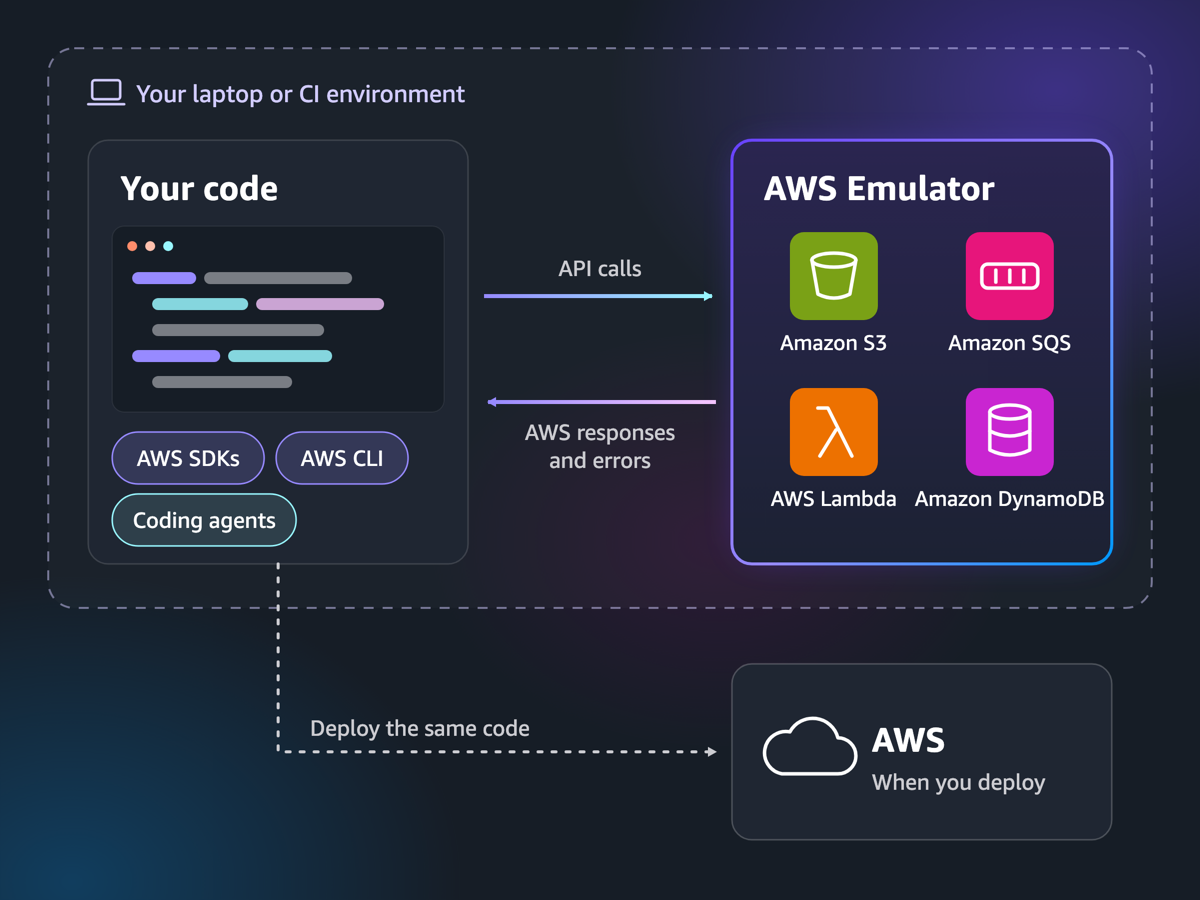
AWS Emulator is a free program from Amazon Web Services that runs AWS's APIs on your own machine, so the AWS CLI, the AWS SDKs and coding agents can create buckets, tables and queues without touching a real AWS account. AWS launched it on November 11, 2026. It has no service fee, its source is public on GitHub, and it runs natively on Linux and in Docker on macOS and Windows.
The point is speed. A test that creates a DynamoDB table, writes an item and reads it back normally needs a deployment and a real account. Against the emulator it runs on a laptop in seconds, and a coding agent can try, fail and retry without waiting on the cloud or running up a bill.
What AWS Emulator does
You start the emulator, and it listens for HTTPS requests on 127.0.0.1, port 9297. It writes its own credentials, a config file and a certificate to ~/.aws/emulator/9297/. You then set a few environment variables so your SDK or CLI sends requests to your machine instead of AWS. Your application code doesn't change.
A few details matter in practice:
- It is built from AWS's own API models. The emulator supports the APIs of services that have a model in AWS's public API models repository, the same models the SDKs are generated from. So requests and errors have the same shape as on AWS.
- It refuses real keys. It generates new access keys each time it starts. Their IDs begin with
EMULATOR, and it rejects requests signed with any other keys. Every request must be signed with Signature Version 4, as on AWS. - It fails loudly on gaps. If an operation isn't implemented yet, the emulator returns HTTP 501 with the error code
NotImplemented, so a test fails instead of passing by accident. - It is one account in one place. The emulator acts as a single account,
000000000000, with no cross-account or cross-Region behavior.
The emulator is written in Rust to keep CPU and memory use low. AWS says agents built and maintain it from those API models, running on Amazon Bedrock AgentCore, with a separate security agent reviewing each change. The GitHub repository doesn't accept pull requests.
Is AWS Emulator free and open source
Yes on both counts, as of November 22, 2026. AWS says the emulator "has no additional service fee," and you pay only for AWS resources when you deploy to AWS. You don't need an AWS account to download or run it.
The source code is under the CC0 1.0 public domain dedication, except code in its vendor/ folder, which is under the Apache License 2.0.
One thing to know: by default the emulator sends anonymous usage and error data to AWS. Set the environment variable EMULATOR_TELEMETRY=off, or start it with --telemetry off, to turn that off.
How to run AWS Emulator
AWS documents four ways to start: a Linux package, Docker, an embedded mode for Rust tests, and an aws-emulator skill that an AI coding agent such as Kiro, Cursor or Claude Code can use to install and start it for you (that path needs AWS CLI 2.35.0 or later).
On Linux
The package needs a 64-bit Linux system with glibc 2.17 or later. On Debian or Ubuntu (amd64), AWS's Linux guide gives:
curl -fsSLo aws-emulator.deb https://downloads.aws.com/aws-emulator/packages/aws-emulator/LTS/latest/aws-emulator_amd64.deb
sudo apt-get install -y ./aws-emulator.deb
aws-emulator -v
On Amazon Linux, Fedora and other RPM systems:
sudo dnf install -y https://downloads.aws.com/aws-emulator/packages/aws-emulator/LTS/latest/aws-emulator-x86_64.rpm
Arm machines use the arm64 (Debian) or aarch64 (RPM) package instead. AWS signs each package, and the guide explains how to check the signature with gpg before installing. Then start it with aws-emulator.
With Docker on macOS and Windows
AWS doesn't publish a ready-made image. The Docker guide has you build one from a short Dockerfile that installs the Linux package on Amazon Linux 2023, then run it like this on macOS:
mkdir -p ~/.aws/emulator
docker build -t aws-emulator .
PORT=9297
docker run --rm --memory=2g --memory-swap=2g -p 127.0.0.1:$PORT:$PORT \
  -e HOME="$HOME" -v "$HOME/.aws/emulator:$HOME/.aws/emulator" \
  aws-emulator -p $PORT
On Apple silicon, swap the x86_64 package for the aarch64 one in the Dockerfile. Keep the 127.0.0.1 in the port mapping: AWS warns that -p 9297:9297 opens the emulator to your whole network.
Point the AWS CLI at it
In another terminal, set the variables from AWS's launch post, and clear any real credentials:
export AWS_ENDPOINT_URL=https://127.0.0.1:9297
export AWS_SHARED_CREDENTIALS_FILE=~/.aws/emulator/9297/emulator_credentials
export AWS_CONFIG_FILE=~/.aws/emulator/9297/config
export AWS_EC2_METADATA_DISABLED=true
export AWS_DISABLE_HOST_PREFIX_INJECTION=true
export AWS_REGION=us-east-1
export AWS_DEFAULT_REGION=us-east-1
unset AWS_ACCESS_KEY_ID AWS_SECRET_ACCESS_KEY AWS_SESSION_TOKEN AWS_PROFILE
Then aws sts get-caller-identity should show account 000000000000, and aws s3 mb s3://test-bucket creates a bucket on your machine. Some SDKs, such as the AWS SDK for Java, need an extra setting to trust the emulator's certificate.
Embedded mode for Rust tests
For the AWS SDK for Rust, the aws-emulator-embedded crate runs the emulator inside the test process. Each instance keeps its own state, so tests don't share buckets or tables and can run in parallel.
These commands come from AWS's documentation. They were not run for this article.
How well it matches real AWS
AWS measures this with "fidelity tests": short SDK programs that run a workflow on real AWS and check that the emulator gives the same status codes, data and exact errors. AWS publishes a score for each service with every release, such as 40 of 50, on the GitHub releases page, and the tests themselves sit in a public evaluation-suite repository, including the ones that still fail.
The fidelity guide is frank about where it stands. The emulator matches AWS most closely on control-plane APIs, the calls that create, describe, update and delete resources. Data-plane behavior, such as reading and writing objects, and support for CloudFormation, Terraform and the AWS CDK vary by service.
What AWS Emulator doesn't do
- No IAM checks. It doesn't evaluate IAM or resource-based policies the way AWS does, so a request AWS would deny may succeed. AWS says not to use it to test security.
- Not for production. It is for building and testing only.
- No multi-account or multi-Region setups. Everything runs as one account.
- Uneven coverage. Check the fidelity scores for the services your project uses before relying on it.
AWS Emulator vs LocalStack
LocalStack has been the usual way to fake AWS locally. The main differences, from each company's own pages as of November 22, 2026:
| AWS Emulator | LocalStack for AWS | |
|---|---|---|
| Made by | AWS | LocalStack |
| Price | No fee | Hobby plan free for non-commercial use; Base $39 a month per license billed annually ($45 monthly); Ultimate $89 a month billed annually |
| Account needed | No | Yes, an account and auth token |
| Source | Public, CC0 1.0 | Legacy Community edition no longer receives product updates |
The free LocalStack Hobby plan can't be used commercially, and AWS Emulator has no such limit. For a team testing common services such as S3, DynamoDB, SQS and Lambda, AWS Emulator is now worth trying first because it costs nothing and needs no sign-up. Check its fidelity scores for your services before you switch.
Frequently asked questions
Is AWS Emulator free?
Yes. AWS says it has no additional service fee, and you don't need an AWS account to download or run it. You pay only for AWS resources when you deploy to AWS.
Is AWS Emulator open source?
Its source is public on GitHub under the CC0 1.0 public domain dedication, with the vendor folder under Apache 2.0. The project doesn't accept pull requests.
Does AWS Emulator run in Docker?
Yes. AWS doesn't publish a prebuilt image, but its docs give a short Dockerfile to build one. Docker is the supported way to run it on macOS and Windows.
Is AWS Emulator a replacement for LocalStack?
It does the same job for many tests and costs nothing, while LocalStack's free plan is limited to non-commercial use. Check AWS's fidelity scores for the services you use before switching.