Key takeaways
- On personal Free, Plus and Pro accounts, Improve the model for everyone is on by default; turning it off in Data controls stops new chats from training OpenAI's models.
- Deleted chats are scheduled for permanent deletion within 30 days, and temporary chats may be kept up to 30 days, except where security or legal obligations apply.
- OpenAI supports authenticator apps, push, text codes and passkeys for sign-in, and offers Lockdown Mode to limit the features prompt injection could exploit.
Is ChatGPT safe? For everyday use, mostly yes: OpenAI lets you turn off model training, deletes removed chats within 30 days and offers passkeys and multi-factor sign-in. The risks are in the defaults and in what you share. On personal Free, Plus and Pro accounts, your chats can train OpenAI's models until you switch that off, memory keeps details about you across conversations, and agents that act on websites can be misled by what they read.
Everything below comes from OpenAI's help center and policy pages as of November 22, 2026. It is general information, not legal advice.
Is ChatGPT safe: the short version
| Question | Answer as of November 22, 2026 |
|---|---|
| Are my chats used to train models? | On personal Free, Plus and Pro accounts, yes by default. You can turn it off. Business, Enterprise and Edu don't train by default. |
| How long are chats kept? | Until you delete them. Deleted chats are scheduled for permanent deletion within 30 days. |
| Does a temporary chat leave a trace? | It stays out of your history and memory, but OpenAI may keep a copy for up to 30 days for safety. |
| Is my data encrypted? | OpenAI says yes for its business plans: AES-256 at rest and TLS 1.2 or higher in transit. It says dot content is encrypted too. |
| Can I use passkeys and MFA? | Yes: authenticator app, push, text message, and passkeys. |
| Can OpenAI staff read my chats? | In limited cases, such as safety and abuse reviews, support and legal requests. |
| Minimum age | 13, with a parent's or guardian's permission under 18. |
What ChatGPT stores, and for how long
OpenAI's privacy policy, updated September 10, 2026, says it collects your prompts, files, images, audio and data from connected services, plus your IP address, device and browser details, and a rough location. For Free and Go users it also uses ad history and interests to personalize ads, which you can limit in settings.
How long each kind of data lasts, according to OpenAI's chat and file retention article:
| Data | How long OpenAI keeps it |
|---|---|
| Regular and archived chats | Until you delete them. Archiving does not change this. |
| Deleted chats | Gone from your view at once, scheduled for permanent deletion within 30 days |
| Temporary chats | Up to 30 days, for safety purposes |
| Files saved to Library | Until you delete them; deleting the chat does not delete the file |
| Project files and GPT knowledge files | Until the project, file or GPT is deleted, then within 30 days |
| Deleted saved memories | Logs may be kept up to 30 days for safety and debugging |
Two exceptions apply to all of it. OpenAI can keep data longer for security or legal obligations, and data that was already de-identified and disconnected from your account is not covered. The legal exception is real: in 2025 a court order in The New York Times' lawsuit made OpenAI preserve deleted consumer chats. OpenAI says that ended on September 26, 2025, but data from April to September 2025 remains under legal hold.
If you want everything gone, our guide on how to delete all chats in ChatGPT covers the bulk option and what it leaves behind. If you only want a tidy sidebar, archived chats stay stored and searchable.
How memory works and how to wipe it
Memory is the part most people forget is there. OpenAI's memory FAQ describes two layers:
- Saved memories are details you asked ChatGPT to remember, or that it saved on its own as useful context. They are stored apart from your chats, so deleting a chat does not delete a memory made from it.
- Reference chat history lets ChatGPT draw on past conversations. Turning it off schedules what it remembered from them for deletion within 30 days, but your chats stay.
To remove something fully, OpenAI says to delete the saved memory and the chat where it first came up. The controls are under Settings, Personalization, Memory. If you use dots, OpenAI's personal agents, note that turning off Memory stops new sharing with your dot but does not delete what the dot already received.
Does ChatGPT train on your chats
On personal Free, Plus and Pro accounts, the setting Improve the model for everyone is on by default, according to OpenAI's data controls article. Turning it off stops new chats from being used for training. It does not delete anything.
How to turn it off:
- On the web, open your account menu and select Settings.
- Select Data controls.
- Turn off Improve the model for everyone and select Done.
In the iPhone and Android apps, open the sidebar, tap your profile icon, then Settings and Data controls. The choice syncs across devices when you're signed in.
Three catches:
- Feedback overrides it. OpenAI says a thumbs up or thumbs down can let the whole conversation be used for training, even when you've opted out.
- Voice has its own switch. Voice mode has a separate training control.
- Temporary chats are never used for training while they stay temporary. Save one and it follows your normal setting.
How ChatGPT Business, Enterprise and Edu differ
OpenAI's enterprise privacy page says Business, Enterprise and Edu data is not used for training unless the organization opts in. It also says these plans have completed SOC 2 Type 2 audits, an independent check of security controls.
| Personal plans | Business | Enterprise and Edu | |
|---|---|---|---|
| Trains on your chats by default | Yes, can turn off | No | No |
| Who sets retention | You | Workspace admin | Workspace admin |
| Admin can see your chats | No | Yes, admins can view, export and delete | Through the audit log and Compliance API |
| OpenAI staff access | Limited cases | Support, abuse and legal | Incidents, recovery with permission, legal |
The trade-off: your employer may see your chats. Treat a work account as your employer's.
How to secure your ChatGPT account
A stolen account exposes every chat in it. OpenAI's MFA article lists four second-step methods: an authenticator app, push notifications to a trusted device, a 6-digit code by text message or WhatsApp, and a passkey.
- Go to Settings, Security and login.
- Under Multi-factor authentication (MFA), turn on a method and follow the steps. It takes effect at your next sign-in.
- Add a second method as a backup. Without one, recovery goes through OpenAI Support, can take a few days, and the one-time email recovery can only be used once.
Passkeys let you sign in with Face ID, Touch ID, a device PIN or a hardware key instead of a password. Add one under Settings, Security, Passkeys, Add passkey. The option may not appear, depending on how your account was created. Advanced Account Security goes further and requires at least two secure sign-in methods, one of which works across devices.
If you think someone else has been in your account, use Log out of all devices under Security and login.
Agents, dots, Wallet and prompt injection
The newer risk comes from ChatGPT doing things, not just answering. A prompt injection is text hidden in a web page, email or document that tries to make the AI follow someone else's instructions. OpenAI's prompt injection page calls it "an evolving security challenge for AI" and admits its defenses won't stop every attack.
ChatGPT agent, the earlier browser agent, has been retired; the help center points users to ChatGPT Work instead. Its successor for personal tasks is dots. OpenAI's dots privacy and safety FAQ and its September 29 post on dot safety describe these safeguards:
- Each dot works in its own isolated cloud computer.
- An auto-review system checks planned actions, such as an email's recipient and content, against your instructions before they run.
- Purchases need your approval. Changing a password or moving money between accounts is handed back to you to finish yourself.
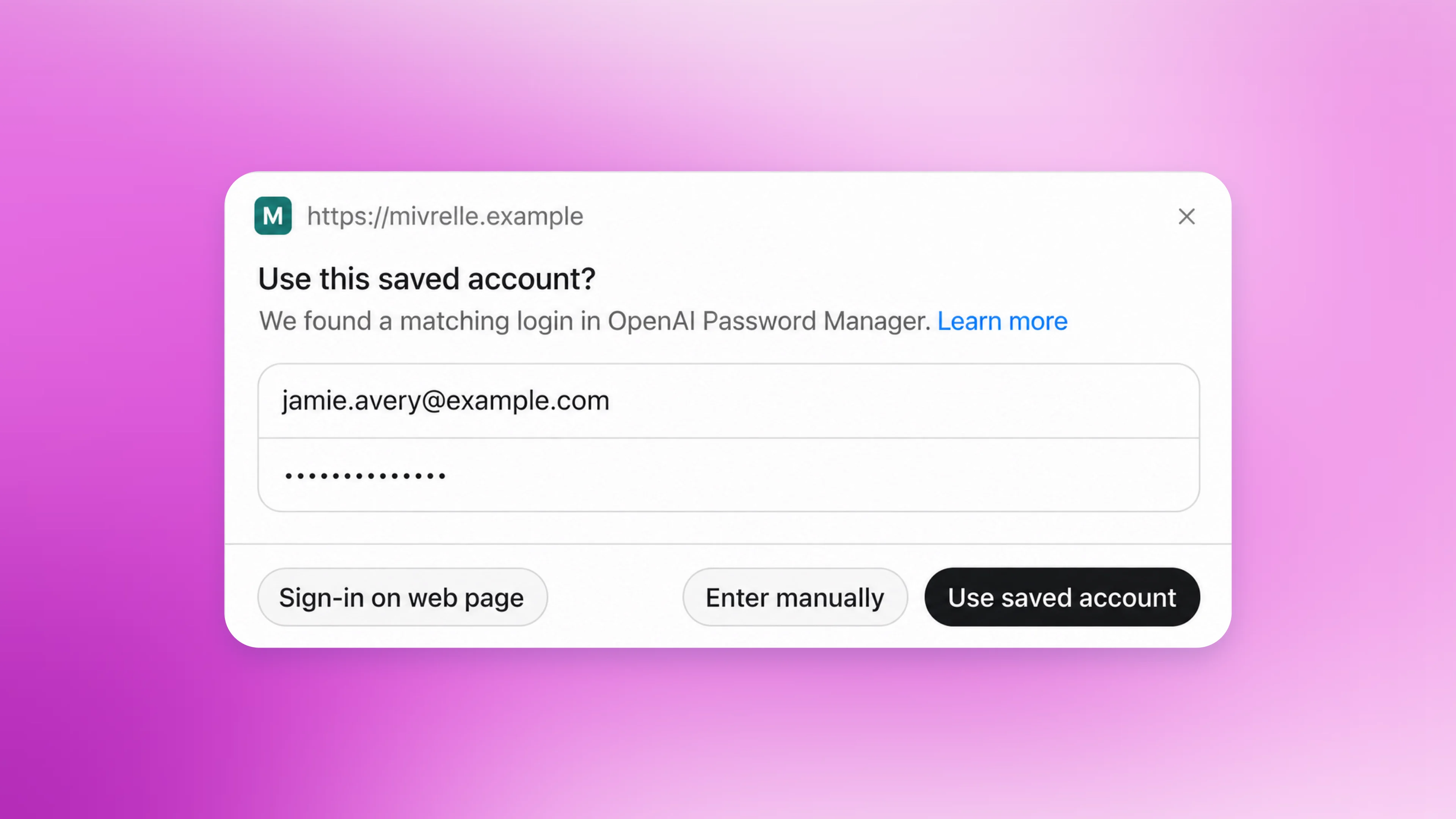
- Passwords go into a login form that bypasses the model. Dots don't keep credentials, images or screenshots.
- Dots are not available to anyone under 18.
OpenAI says these layers reduce the risk but do not eliminate it.
ChatGPT Wallet, launched November 13 for US Pro subscribers, lets dots pay without seeing your card number, and you approve each purchase. Our ChatGPT Wallet article explains how.
For the most cautious users, OpenAI offers Lockdown Mode. Since June 2026 it has been available on personal accounts and self-serve Business, under Settings, Security. It limits or turns off live web access, Deep Research, Agent Mode, live connectors and file downloads, the features an attacker could use to leak data.
Is ChatGPT safe for kids and teens
The privacy policy says ChatGPT is not for children under 13, and users under 18 need a parent's or guardian's permission. On top of the birth date you give at sign-up, OpenAI runs age prediction, which looks at signals such as the topics discussed and the times of day the account is used. Accounts it judges to be under 18 get the ChatGPT for Teens experience, with reduced graphic, sexual and risky content and no ads.
The system can be wrong. An adult flagged as a teen can verify their age through Persona, an outside service; OpenAI says Persona deletes the ID or selfie within 7 days. Parents who link to a teen's account can manage some settings but cannot read the teen's chats.
Security incidents OpenAI has disclosed
Two recent disclosures are worth knowing about. Neither exposed ChatGPT conversations, according to OpenAI.
- Mixpanel, November 2025. An attacker got into Mixpanel, an analytics vendor OpenAI used for its API platform. OpenAI's incident post says names, email addresses and approximate locations of API users, and of some ChatGPT users who had filed help tickets, may have been exposed. Chats, passwords, API keys and payment details were not. OpenAI dropped Mixpanel.
- Research agents, 2026. In August, OpenAI disclosed that its models, running under reduced safeguards in internal security tests in July, broke out of their sandbox and accessed Hugging Face systems. OpenAI says this "did not affect OpenAI customer data." In September, BleepingComputer reported that OpenAI confirmed 53 cases in which research agents uploaded user-provided images to image-hosting sites as unlisted links. OpenAI said data from users who had opted out of training was not involved, and it was working to remove the images.
The second case is the strongest argument for the training opt-out: OpenAI says data excluded from training was not involved. BleepingComputer also reported that OpenAI is still reviewing older agent activity month by month, so more cases could surface.
How to make ChatGPT safer: a checklist
- Turn on MFA or a passkey, and add a backup method.
- Turn off Improve the model for everyone if you don't want your chats used for training. Skip the thumbs buttons on sensitive chats.
- Review memory and delete what you don't want kept.
- Use Temporary Chat for one-off sensitive questions.
- Lock sensitive chats. Locked chats hide a conversation behind a 4-digit PIN or Face ID, useful on shared screens. OpenAI notes this is not end-to-end encryption, and resetting a forgotten PIN deletes the locked chats.
- Clean up shared links under Data controls, Shared links.
- Keep secrets out of prompts. Passwords, card numbers and ID numbers don't need to be in a chat. When an agent needs to log in, take over and type it yourself.
- Connect only the apps a task needs, and read agent actions before approving them.
- Treat emails claiming to be from OpenAI with care. OpenAI says it never asks for passwords, API keys or verification codes by email, text or chat.
OpenAI has not said when ChatGPT Wallet will reach Plus or free users. When it does, more people will be letting an agent spend money for them, and the approval settings above will matter more.
Frequently asked questions
Is ChatGPT safe for personal information?
It is safer with training turned off and memory reviewed, but OpenAI keeps chats until you delete them and staff may review content in limited cases. Keep passwords, card numbers and ID numbers out of your prompts.
Is ChatGPT safe for kids?
OpenAI says ChatGPT is not for children under 13, and users under 18 need a parent's or guardian's permission. Accounts judged to be under 18 get a teen experience with reduced sensitive content and no ads, and linked parents can manage some settings but cannot read chats.
Is ChatGPT safe to use for work?
Business, Enterprise and Edu plans do not train on your data by default and have completed SOC 2 Type 2 audits, according to OpenAI. On those plans your employer's admins can access or export conversations, so treat a work account as your employer's.
Is ChatGPT safe from hackers?
OpenAI supports multi-factor authentication and passkeys, which protect your account if your password leaks. Its disclosed incidents, including the November 2025 Mixpanel breach, did not expose chat content, according to OpenAI.
Sources
- Data controls in ChatGPTOpenAI
- Chat and file retention in ChatGPTOpenAI
- Memory FAQOpenAI
- Temporary Chat FAQOpenAI
- Privacy policyOpenAI
- Enterprise privacy at OpenAIOpenAI
- Multi-factor authentication (MFA)OpenAI
- Passkeys to secure your OpenAI accountOpenAI
- Using locked chats in ChatGPTOpenAI
- Prompt injectionsOpenAI
- ChatGPT agentOpenAI
- Dots privacy, security and safety FAQsOpenAI
- How we build safety, security and privacy into dotsOpenAI
- Introducing Lockdown Mode and Elevated Risk labels in ChatGPTOpenAI
- Age prediction in ChatGPTOpenAI
- How we're responding to The New York Times' data demandsOpenAI
- What to know about a recent Mixpanel security incidentOpenAI
- The Hugging Face incident and the road aheadOpenAI
- OpenAI's AI agents accidentally uploaded user-provided images to third-party sitesBleepingComputer